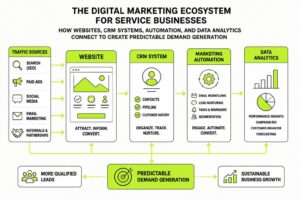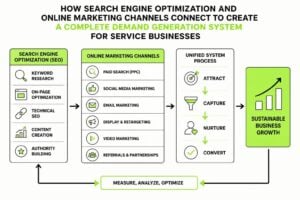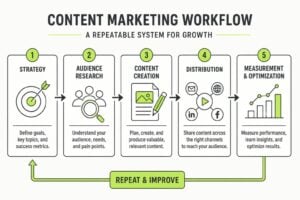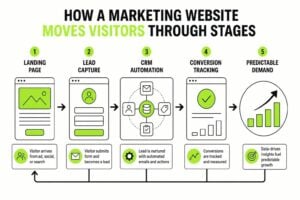
Most small businesses lose more opportunities through disorganization than they do through bad marketing. Leads slip through cracks, follow-ups get forgotten, and customer data lives in seventeen different places. A proper CRM setup for small business fixes this, but only if you approach it with a clear plan. This isn't about adopting enterprise software or learning complex automation. It's about building a system that protects your leads, tracks your conversations, and makes growth predictable instead of chaotic.
Why Small Businesses Need CRM Infrastructure
The jump from mental notes and spreadsheets to structured CRM happens when you can't keep track anymore. Maybe you're emailing the same prospect twice. Maybe your team doesn't know who spoke to which customer. Maybe you're writing down follow-up reminders on sticky notes that get lost.
These aren't minor inconveniences. They're revenue leaks.
A CRM setup for small business solves four core problems:
- Lost leads – Every enquiry gets captured and tracked until it converts or dies
- Forgotten follow-ups – The system reminds you when to touch base
- Team confusion – Everyone sees the same customer history and context
- Wasted time – Automation handles repetitive tasks so you can focus on actual work
When choosing the right CRM, most small businesses overcomplicate it. They look at feature lists instead of asking what they actually need. The best CRM is the one you'll use daily, not the one with the longest list of integrations.
The Real Cost of Not Having a CRM
Operating without a CRM costs more than the subscription you're avoiding. You're paying in lost opportunities, duplicated effort, and customer frustration. A prospect who gets ignored for three weeks won't wait around. A customer who has to repeat their story to three different team members won't feel valued.
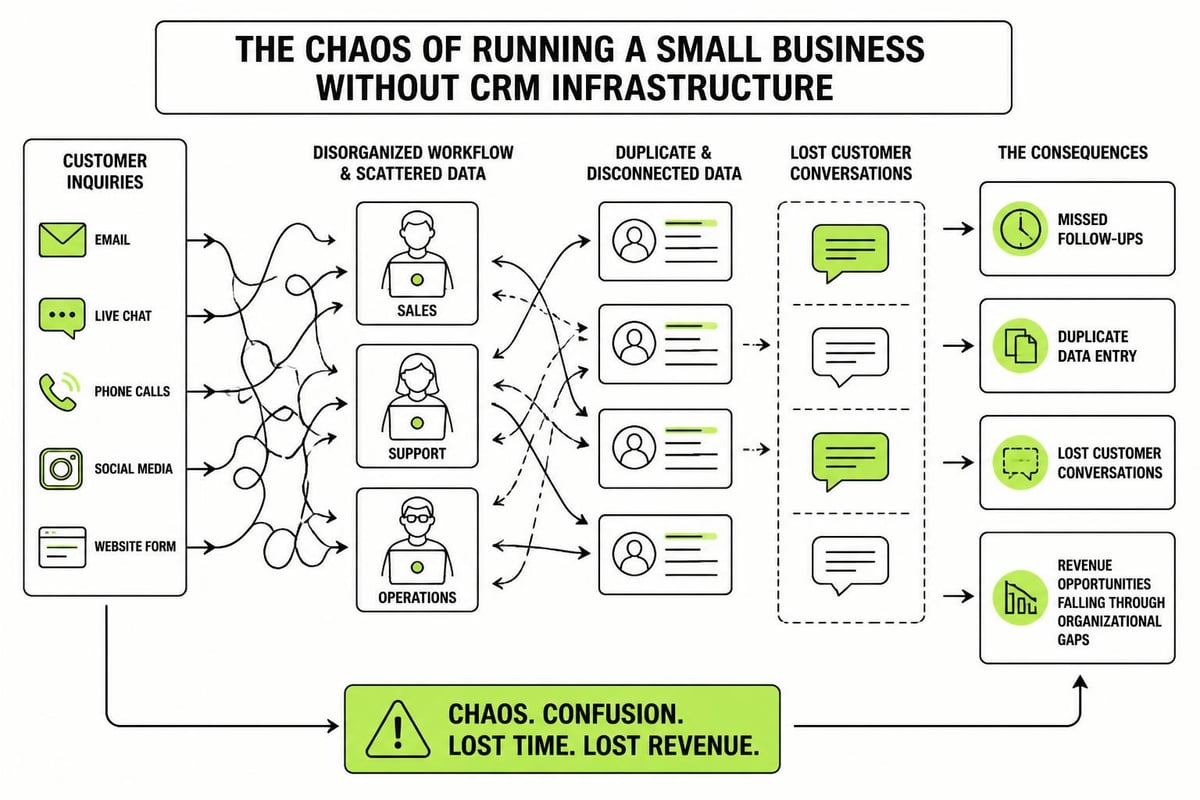
Small service businesses often think they're too small for CRM. That's backwards. You need it more because you have less margin for error. One lost lead matters. One bungled customer experience hurts. Your digital marketing efforts generate attention, but without CRM infrastructure to catch and nurture it, you're just pouring water into a leaky bucket.
Choosing Your CRM Platform
The market offers dozens of CRM options, from free tools to enterprise platforms. For small business CRM setup, you want something that balances simplicity with capability. TechRadar’s evaluation of CRM software provides a good starting point, but your specific needs should drive the decision.
| CRM Type | Best For | Watch Out For |
|---|---|---|
| Simple contact managers | Solo operators, very small teams | Limited automation and reporting |
| Mid-tier platforms | Growing service businesses | Feature creep and complexity |
| Industry-specific CRMs | Businesses with unique workflows | Lock-in and customization costs |
| Enterprise systems | Larger operations | Overkill for most small businesses |
The right choice depends on three factors: team size, complexity of your sales process, and technical comfort level. A business with two people and a simple service offering doesn't need what a 20-person agency needs.
Platform Features That Actually Matter
Ignore the marketing brochures. Most CRM features you'll never touch. Focus on what you'll use daily:
Essential features for small business:
- Contact management that's easy to update
- Pipeline tracking with clear stages
- Task reminders and follow-up scheduling
- Email integration so conversations sync automatically
- Basic reporting to track conversion rates
Nice to have but not critical:
- Advanced automation workflows
- Custom fields and objects
- API access and developer tools
- Built-in phone system
- Social media monitoring
Your CRM setup for small business should feel like it removes friction, not adds it. If you need a manual to send an email or create a task, the platform is too complicated. Xero’s guide to CRM for small business emphasizes integration with existing systems, which matters more than you'd think. Your CRM should talk to your accounting software, email platform, and other tools you already use.
Planning Your CRM Structure
Before you start clicking around in new software, map out what you need to track. This is where most small business CRM setups go wrong. They either track too much (every field becomes mandatory) or too little (not enough context to be useful).
Defining Your Sales Stages
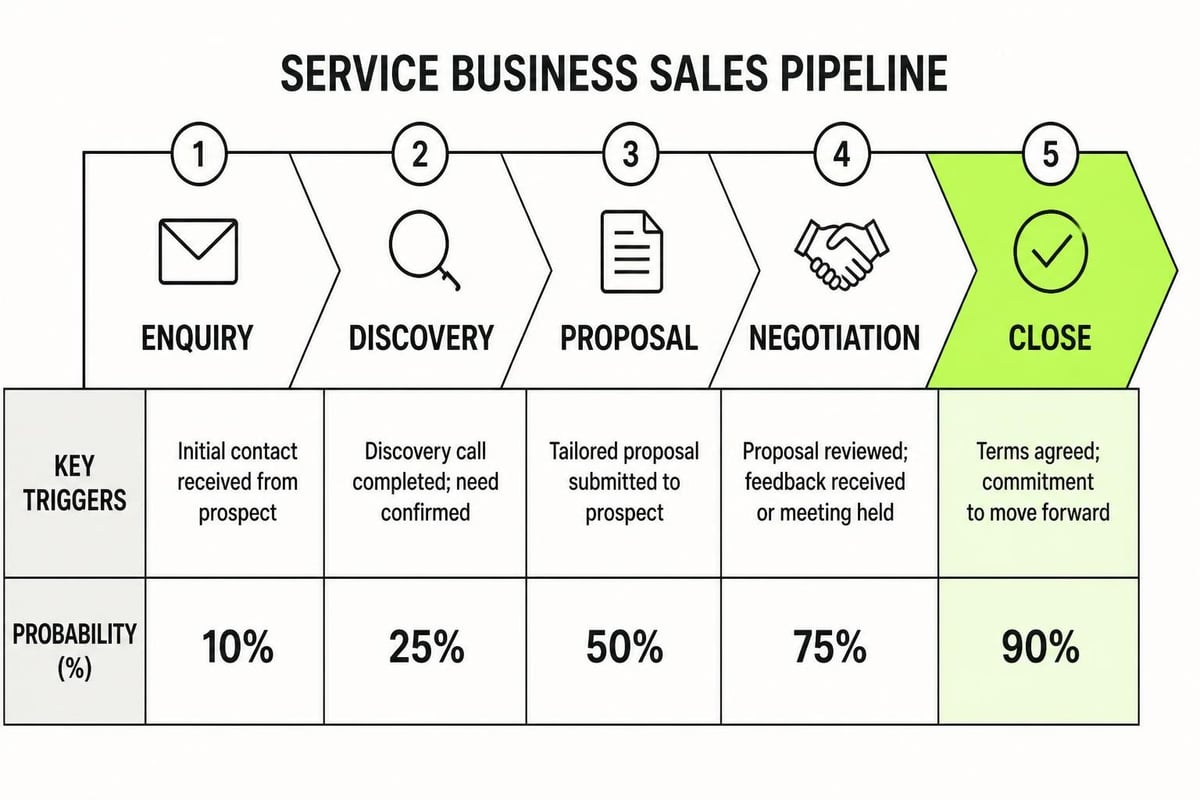
Your pipeline stages should match how you actually sell, not some generic template. A service business might have stages like: Initial Enquiry, Discovery Call Scheduled, Proposal Sent, Negotiation, Won, Lost. That's simple and accurate.
Be specific about what moves a deal from one stage to the next. "Discovery Call Scheduled" means there's a calendar booking. "Proposal Sent" means the document went out with a date stamp. Clear definitions prevent confusion.
Pipeline design principles:
- Keep it to 5-7 stages maximum
- Name stages after concrete actions, not vague concepts
- Define the exact trigger that moves a deal forward
- Track probability at each stage so forecasting works
- Review and adjust quarterly based on actual conversion patterns
Contact Data You Actually Need
Every field you add is another thing to maintain. Start minimal. You can always add more later, but removing unused fields after the fact is painful.
Core contact information:
- Name and company
- Email and phone
- How they found you
- Primary service interest
- Deal value and stage
- Next action and due date
That's it for most small businesses. You don't need birthday fields, social media profiles, or 17 custom categories. You need enough context to have an informed conversation and know what to do next.
The 7-Step Marketing Plan framework we use with clients emphasizes that your CRM setup should support each step from initial contact through to generating referrals. Your data structure should reflect this journey, tracking where each contact sits in your marketing system and what stage of the relationship they're in.
Implementing Your CRM Setup
Implementation is where enthusiasm meets reality. You've chosen a platform and planned your structure. Now you need to actually build it, migrate your data, and get your team using it.
Data Migration Strategy
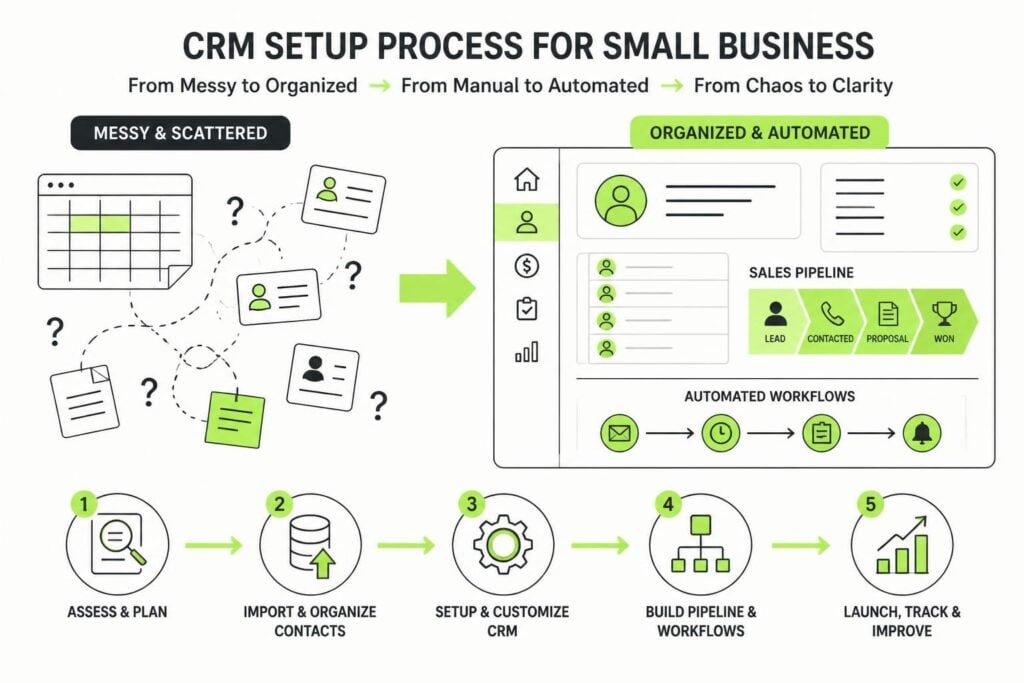
If you're moving from spreadsheets, email contacts, or another system, clean your data first. Importing garbage creates a garbage CRM.
Pre-migration cleanup:
- Remove duplicates – Merge multiple entries for the same contact
- Standardize formatting – Pick one format for phone numbers, addresses, company names
- Validate email addresses – Remove obvious typos and invalid addresses
- Archive dead contacts – Don't import people you haven't contacted in two years
- Categorize by status – Mark which contacts are active leads, customers, or past opportunities
Most CRMs import via CSV files. Export your current data, clean it in a spreadsheet, then map the columns to your new CRM fields. Test with a small batch first. Import 20 contacts, check they look right, then do the full migration.
Setting Up Automation Workflows
Automation is powerful but start simple. Your first CRM setup for small business should automate three things: lead capture, follow-up reminders, and basic email sequences.
| Automation | Purpose | Example Trigger |
|---|---|---|
| Lead capture | New enquiries go straight to CRM | Website form submission |
| Task creation | Follow-ups don't get forgotten | Deal moves to new stage |
| Email sequence | Nurture leads automatically | Contact tagged as "newsletter subscriber" |
| Assignment rules | Right person gets the lead | Lead source or service type |
The CIO’s CRM best practices article highlights the importance of understanding user workflows before building automation. Watch how your team actually works, then automate the repetitive bits. Don't automate for the sake of it.
Training Your Team on the New System
The fanciest CRM setup for small business is worthless if your team doesn't use it. Adoption is the hard part, and it requires more than a single training session.
Creating Buy-In Before Launch
People resist change, especially when they're already busy. Before rolling out your CRM, explain what's in it for them. Not the business, them personally.
How to frame it:
- "No more digging through email to find customer history"
- "The system reminds you when to follow up, so nothing falls through"
- "You can see what everyone else has discussed with this customer"
- "Less time on admin means more time on actual work"
Show them the pain it solves, not the features it has. Most small businesses find that once team members experience the relief of not losing track of leads, they become advocates.
Building Sustainable Habits
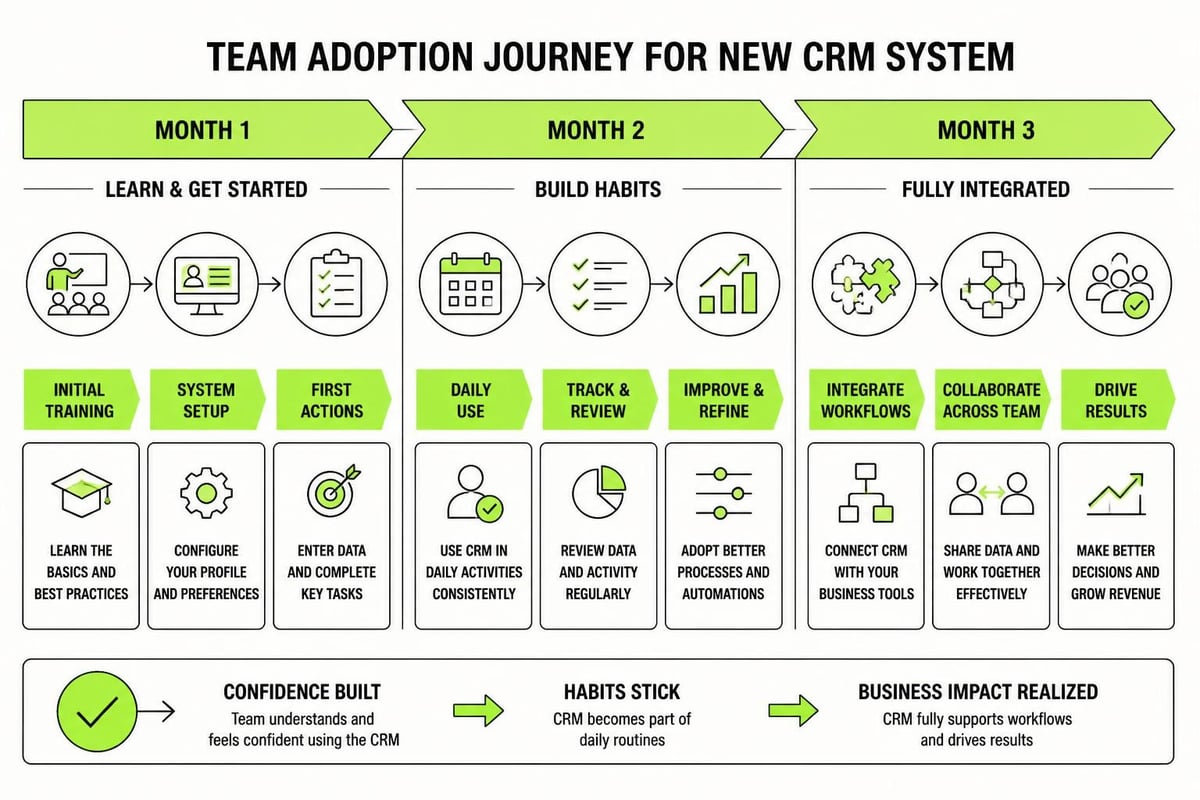
Training isn't a one-off event. It's an ongoing process of building habits and refining workflows.
Week one: Daily check-ins to answer questions and fix confusion
Week two: Watch how people use the system and adjust your setup
Week three: Start measuring adoption (are tasks being created? Are notes being added?)
Month two: Gather feedback and make improvements
Month three: Review what's working and what's ignored
Make CRM use part of your daily rhythm. Start team meetings by reviewing the pipeline. End the day by updating your tasks. The system becomes valuable when it's where work happens, not something you update after the fact. Understanding how marketing and business development work together helps frame the CRM as the central nervous system of your growth efforts.
Maintaining and Optimizing Your CRM
A CRM setup for small business isn't set and forget. It needs regular maintenance and thoughtful optimization as your business evolves.
Weekly CRM Hygiene Tasks
Dirty data degrades fast. Set aside time each week to keep things clean.
- Review duplicates – Merge contacts that got created twice
- Update stale records – Archive or delete contacts that haven't engaged in 6+ months
- Check incomplete data – Fill in missing information for active opportunities
- Verify automation – Make sure workflows are firing correctly
- Review pipeline accuracy – Move deals that are stuck in wrong stages
Assign someone on your team as the CRM owner. Not to control it, but to maintain it. This person runs the weekly cleanup, answers questions, and suggests improvements.
Measuring What Matters
Your CRM should generate insights, not just store data. Track metrics that inform decisions.
Key reports to run monthly:
- Conversion rate by stage – Where do deals get stuck or drop off?
- Average deal size and sales cycle length – Are these improving over time?
- Lead source performance – Which marketing channels produce the best opportunities?
- Team activity – Is everyone using the system consistently?
- Win/loss reasons – Why do you win? Why do you lose?
These numbers tell you what's working and what needs attention. If your conversion rate from discovery call to proposal is 80%, but proposal to close is 20%, you know where the problem lives.
Common Setup Mistakes to Avoid
Even with good intentions, small businesses make predictable mistakes when implementing CRM. Learn from others' pain.
Overcomplicating at Launch
The biggest mistake is trying to build the perfect system from day one. You add custom fields for every conceivable scenario. You create 15 pipeline stages. You build complex automation workflows before you understand the basics.
Start simple. Add complexity only when you feel the pain of not having it.
Your first version should handle contact storage, basic pipeline tracking, and simple tasks. That's it. Run that for two months. Then add automation. Then add custom reporting. Build in layers.
Ignoring Data Entry Discipline
A CRM is only as good as the data inside it. If notes don't get added, if stages don't get updated, if contacts have incomplete information, the system becomes useless fast.
Establish non-negotiable standards:
- Every customer conversation gets logged within 24 hours
- Deal stages update in real time, not at the end of the week
- Contact information gets verified before filing
This requires discipline and accountability. When someone slacks on data entry, it affects everyone who touches that customer next. Many businesses working on small business digital marketing services find that CRM discipline directly impacts campaign effectiveness. You can't segment or personalize if your data is incomplete.
Choosing Tools Based on Features, Not Fit
Just because a CRM can do something doesn't mean you need it to. The platform with the longest feature list isn't the best choice if half those features add complexity without value.
Pick based on:
- Ease of use – Can your team figure it out without constant support tickets?
- Integration – Does it connect with tools you already use daily?
- Scalability – Will it grow with you, or will you outgrow it in 12 months?
- Support quality – When something breaks, can you get help quickly?
Price matters, but it shouldn't be the primary factor. A cheap CRM that nobody uses costs more than a properly priced one that gets adopted. Academic research on open-source CRM systems for SMEs shows that total cost of ownership includes training, maintenance, and opportunity cost of poor adoption, not just licensing fees.
Integrating CRM with Your Marketing Systems
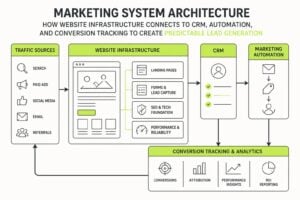
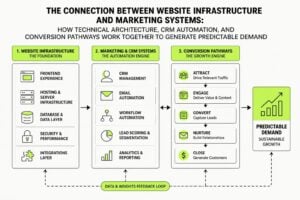
Your CRM setup for small business shouldn't exist in isolation. It needs to connect with your marketing infrastructure to create a closed loop from attention to conversion.
Essential Integrations for Service Businesses
The integrations you need depend on your tech stack, but most service businesses benefit from connecting these systems:
| System | Why Connect | What It Does |
|---|---|---|
| Email marketing | Nurture leads automatically | Sync contacts and track engagement |
| Website forms | Capture leads instantly | New enquiries create CRM contacts |
| Calendar | Schedule meetings smoothly | Bookings create tasks and update stages |
| Accounting | Track customer value | See financial data alongside CRM records |
| Phone system | Log calls automatically | Every conversation gets recorded |
When these systems talk to each other, data flows automatically. A website enquiry creates a contact, triggers an email sequence, and creates a follow-up task. A booked discovery call updates the deal stage and sends a calendar invite. This is where CRM becomes infrastructure, not just a database.
Creating Marketing and Sales Alignment
The handoff from marketing to sales is where many businesses lose momentum. Marketing generates interest, but sales doesn't follow up quickly. Sales needs context, but marketing data stays in separate systems.
Your CRM bridges this gap. Marketing campaigns should tag contacts based on behavior and interest. Sales should see which content someone engaged with before the conversation. Both teams should track the same metrics and work from the same pipeline.
Understanding how branding and digital marketing work together means recognizing that your CRM holds the relationship context that makes marketing personal and sales informed. The future possibilities explored in research on AI integration in CRM systems suggest that this integration will only deepen as tools get smarter.
Scaling Your CRM as You Grow
Your first CRM setup for small business won't be your last. As you grow, your needs change. The system that worked perfectly for three people struggles at ten. The simple pipeline that made sense early on needs more sophistication.
When to Add Complexity
Don't add features because they exist. Add them when you feel specific pain.
Signs you need more sophisticated CRM:
- Your team struggles to find information because there's too much of it
- Your sales process has branched into distinct paths for different service types
- Reporting takes hours of manual work because standard reports don't answer your questions
- You're hiring people who need different access levels and permissions
- You're losing deals because follow-up workflows aren't sophisticated enough
Each of these problems has a solution, but implementing the solution before you feel the pain adds unnecessary complexity. Let your actual business needs pull features into your setup, rather than pushing features in because they sound useful.
Reviewing and Refining Quarterly
Set a calendar reminder for quarterly CRM reviews. Block two hours, gather your team, and ask hard questions.
Quarterly review agenda:
- What's working well? What do we rely on daily?
- What's annoying? Where do we fight the system?
- What data do we wish we had but don't track?
- What fields or workflows do we ignore completely?
- How have our processes changed since last quarter?
Make adjustments based on real feedback, not theoretical improvements. Delete unused fields. Simplify confusing workflows. Add tracking for data that would inform better decisions. Your CRM should evolve with your business, not remain static because "that's how we set it up."
Working with businesses on their digital presence strategy reveals that CRM maturity follows a predictable path. You start with basic contact management. You add pipeline tracking. You build automation. You integrate with marketing systems. You develop sophisticated reporting. Each stage builds on the last, and rushing through them creates more problems than it solves.
A proper CRM setup for small business isn't complicated, but it does require intentional planning and consistent execution. Start simple, focus on adoption, and let real needs drive complexity. If you're ready to build marketing systems that actually protect your leads and create predictable growth, MDO Digital specializes in CRM infrastructure and automation for service businesses. We remove the chaos and build structures that compound over time.