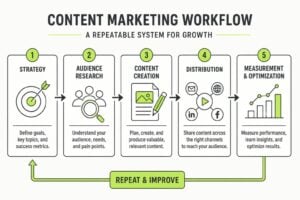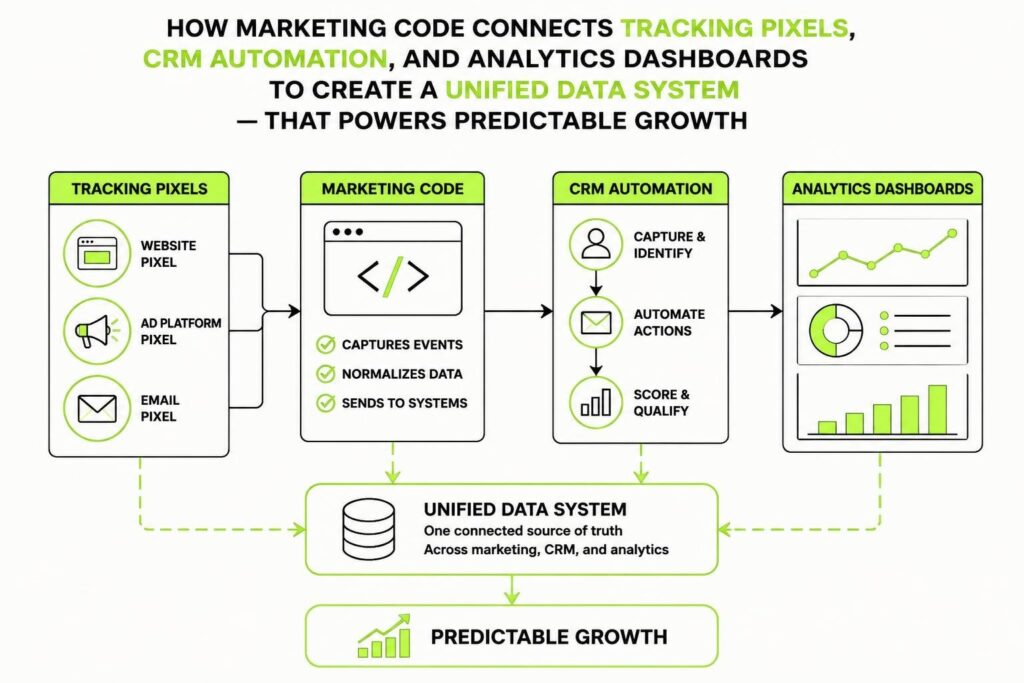
Most marketing teams treat code like a black box. They install scripts, hope they work, and wonder why their data doesn't match up. But code for marketing is the invisible infrastructure that turns scattered activity into repeatable systems. It's the difference between guessing what works and knowing exactly where every lead came from, how they behaved, and what made them convert. For service businesses trying to scale, understanding the technical layer underneath your campaigns isn't optional anymore. It's the foundation of everything that compounds.
What Code for Marketing Actually Means
Code for marketing isn't about becoming a developer. It's about understanding the technical systems that power tracking, automation, and personalisation across your stack.
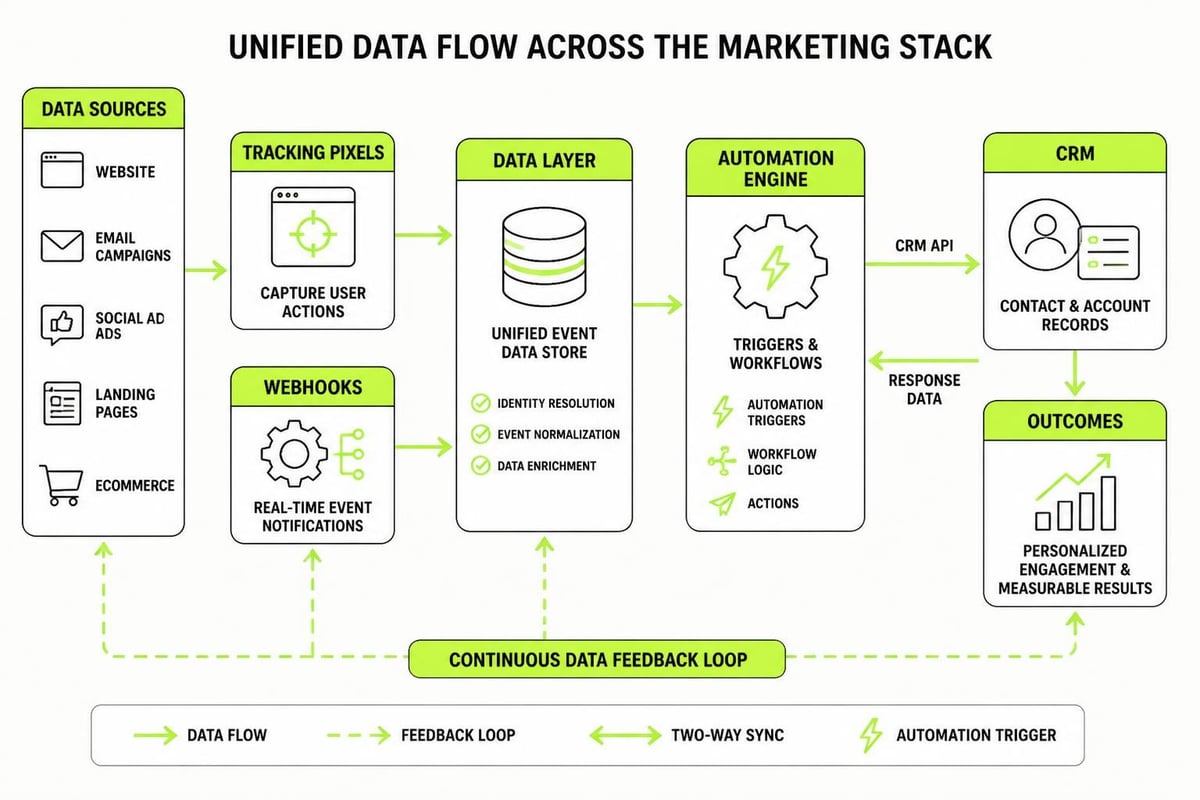
Every pixel, tag, webhook, and API call is code. Every form submission that lands in your CRM, every email automation that triggers based on behaviour, every dashboard that shows where revenue came from. That's all code doing the work.
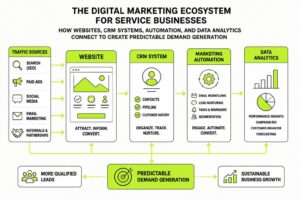
The businesses that grow predictably are the ones that control this layer. They don't just install plugins and hope. They build intentional architectures where data flows cleanly, nothing breaks quietly, and every piece connects to the next.
The Core Components
Here's what code for marketing typically includes across most modern stacks:
- Tracking pixels and tags (Google Analytics, Meta Pixel, LinkedIn Insight)
- Event-based analytics (server-side measurement, custom events)
- CRM integrations (webhooks, API calls, Zapier/Make automations)
- Form handling (validation, submission routing, spam filtering)
- Email automation triggers (behaviour-based sequences, tagging logic)
- A/B testing frameworks (variant delivery, statistical tracking)
- Personalisation engines (dynamic content based on user data)
Each piece is small. Together, they create the system that decides whether your marketing generates chaos or compounds cleanly over time.
Why Most Businesses Get Tracking Wrong
The typical pattern looks like this: install Google Tag Manager, add a few tags, maybe throw in a Facebook pixel, call it done. Then six months later, you realise half your conversions aren't being tracked, your CRM is missing form fills, and nobody knows which channel actually drives revenue.
This happens because code for marketing gets treated as a set-and-forget task instead of infrastructure that needs maintenance, documentation, and governance.
Common Breakpoints
| Problem | What Breaks | Real Cost |
|---|---|---|
| Client-side only tracking | Ad blockers, browser privacy, page abandonment | 20-40% of conversions invisible |
| No consent management | GDPR/privacy violations, blocked scripts, legal risk | Fines + lost tracking in EU/AU |
| Fragmented data sources | CRM doesn't match GA, attribution impossible | Can't optimise spend |
| Hardcoded values | Campaign URLs break, UTMs inconsistent, reporting chaos | Weeks rebuilding reports monthly |
| No testing environment | Changes break live site, data gaps appear mid-campaign | Lost revenue + scrambling |
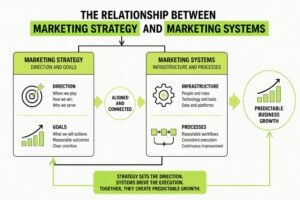
The fix isn't more tools. It's better architecture. Code for marketing works when it's designed as a system, not a pile of scripts.
Building a Clean Tracking Architecture
Start with the data you actually need. Most businesses over-track and under-use. The goal is clean signals that answer: where did this person come from, what did they do, and did they convert?
Layer 1: Client-Side Foundation
Your website runs client-side code in the visitor's browser. This is where most tracking starts, but it shouldn't be where it ends.
- Install a tag manager (Google Tag Manager is free and works)
- Set up core pageview tracking (GA4, not Universal Analytics)
- Add event tracking for key actions (form views, button clicks, video plays)
- Implement Core Web Vitals monitoring (page speed affects conversion and SEO)
- Deploy consent management if you operate in regulated markets
The mistake here is dumping every possible tag into GTM without a plan. Each script slows your site. Each tracker increases privacy risk. Be ruthless about what you actually use.
Layer 2: Server-Side Tracking
Client-side tracking has limits. Users block scripts. Browsers restrict cookies. iOS hides data. If you want reliable attribution and conversion tracking, you need server-side code handling critical events.
This means:
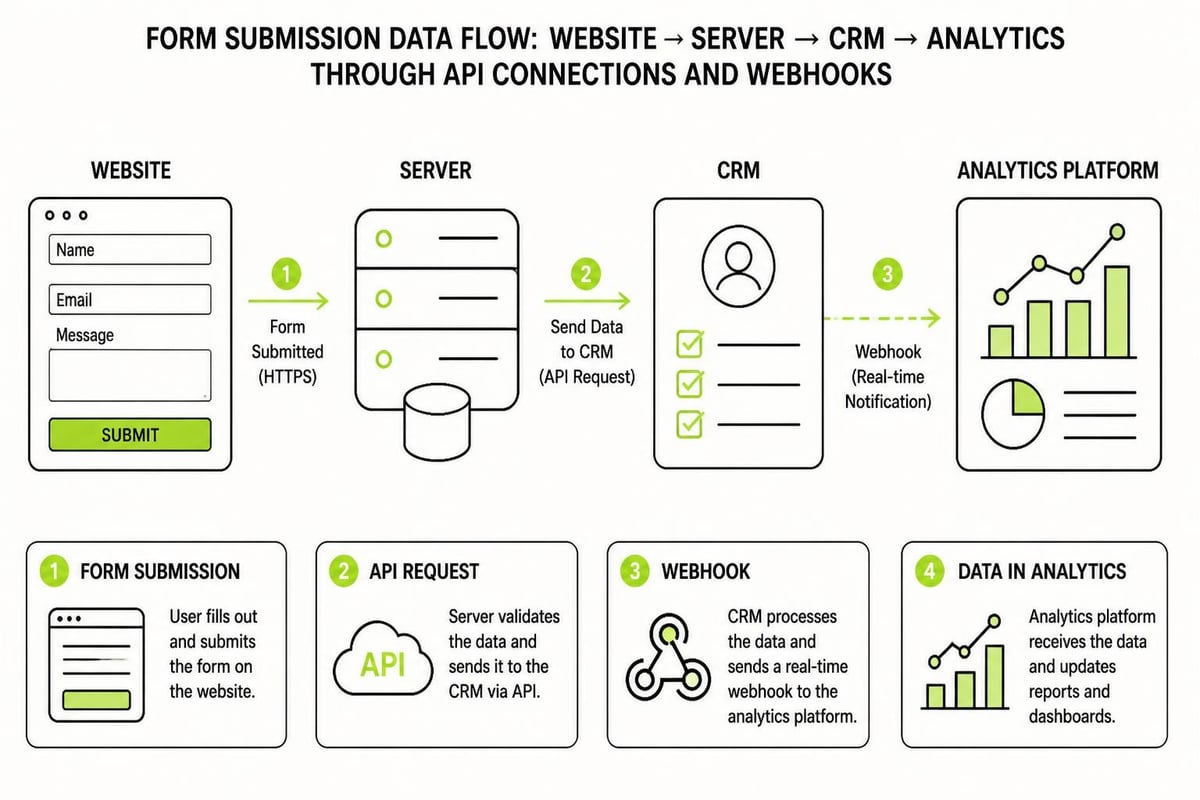
- Form submissions POST directly to your server, then forward to your CRM and analytics
- Purchase confirmations trigger server-to-server conversion events
- Lead scoring updates happen via API calls, not just pixel fires
- Offline conversions (calls, in-person meetings) flow back into ad platforms
Server-side code for marketing is more complex to set up, but it protects your data pipeline from browser changes and privacy updates that wreck client-only tracking.
CRM Automation and Lead Flow
Your CRM is where code for marketing gets seriously valuable. Every lead that enters your system should trigger automatic next steps, tag assignments, and scoring updates without human intervention.
This is where most service businesses leak revenue. A lead fills a form, lands in the CRM, and sits there until someone remembers to follow up. By then, they've moved on.
Automation fixes this:
- Form submission → instant email confirmation + internal alert
- Lead magnet download → tag applied → nurture sequence starts
- Specific page visit → CRM updated → sales gets notified
- Meeting booked → calendar event + reminder sequence + prep email to team
- No response after 3 days → re-engagement email fires
None of this requires a developer if you use the right tools (Zapier, Make, or native CRM automation). But it does require thinking through the logic, mapping the flow, and testing every branch.
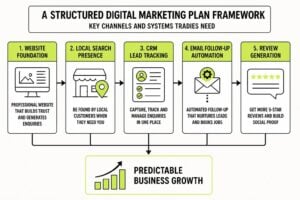
We built this kind of infrastructure into our 7-Step Marketing Plan because the framework only works if the technical layer supports it. You can't run a repeatable system on manual processes.

Webhook Fundamentals
Webhooks are how modern code for marketing connects tools without constant polling. When something happens in Tool A (form submitted, payment received, tag added), a webhook sends that data to Tool B instantly.
Setting them up is straightforward:
- Tool A generates a unique webhook URL
- Tool B gets configured to POST data to that URL when an event fires
- You map which fields go where
- Test it, then monitor for failures
The trick is handling errors gracefully. Webhooks fail. Networks hiccup. APIs go down. Your code for marketing needs retry logic, error logging, and fallback paths so nothing disappears silently.
Privacy, Consent, and Compliance
Here's where code for marketing intersects with legal reality. If you're tracking users in Australia, the EU, California, or anywhere with privacy laws, your code needs to respect consent.
This means:
- Blocking non-essential scripts until consent is given
- Storing consent records (who consented, when, to what)
- Honouring opt-outs (stop tracking, delete data on request)
- Documenting data flows (what goes where, why, how long it's kept)
The IAB Europe Transparency & Consent Framework and the IAB U.S. Multi-State Privacy Toolkit provide technical specifications for managing this properly, though they're dense reads aimed at enterprise teams.
For most service businesses, the practical path is:
- Use a cookie consent tool (CookieYes, OneTrust, Termly)
- Set it to block scripts by default
- Only fire tracking after consent
- Keep consent logs for compliance proof
Skipping this doesn't just risk fines. It breaks trust. And in 2026, trust is the asset that compounds faster than anything else in marketing and business development.
Testing, Experimentation, and Optimisation
Code for marketing isn't static. The best systems are constantly testing variations, measuring results, and iterating based on data.
A/B testing frameworks let you run controlled experiments: same traffic, different experiences, measure which converts better. This applies to landing pages, email subject lines, button copy, form lengths, pricing pages, checkout flows.
Running Valid Tests
Most A/B tests fail because they:
- Run too short (not enough data for statistical significance)
- Test too many variables at once (can't isolate what worked)
- Don't account for external factors (seasonality, promotions, traffic spikes)
- Ignore sample size requirements (calling winners on 50 conversions)
The ArXiv paper on experimentation program optimisation dives deep into the statistical methods and portfolio approaches for running rigorous tests, though it's highly technical.
For practical use, the rules are simpler:
| Test Element | Minimum Sample | Runtime | Confidence Level |
|---|---|---|---|
| Landing page headline | 1,000 visitors per variant | 2 weeks | 95% |
| Email subject line | 500 opens per variant | 1 week | 90% |
| CTA button colour | 2,000 visitors per variant | 3 weeks | 95% |
| Pricing page layout | 500 conversions total | 4+ weeks | 95% |
Don't call a test early because one variant is winning. Wait for statistical significance, or you're optimising for noise.
Data Architecture for Scaling
As your marketing grows, code for marketing shifts from tracking individual events to managing data architecture. You need pipelines, warehouses, transformation layers, and governance frameworks.
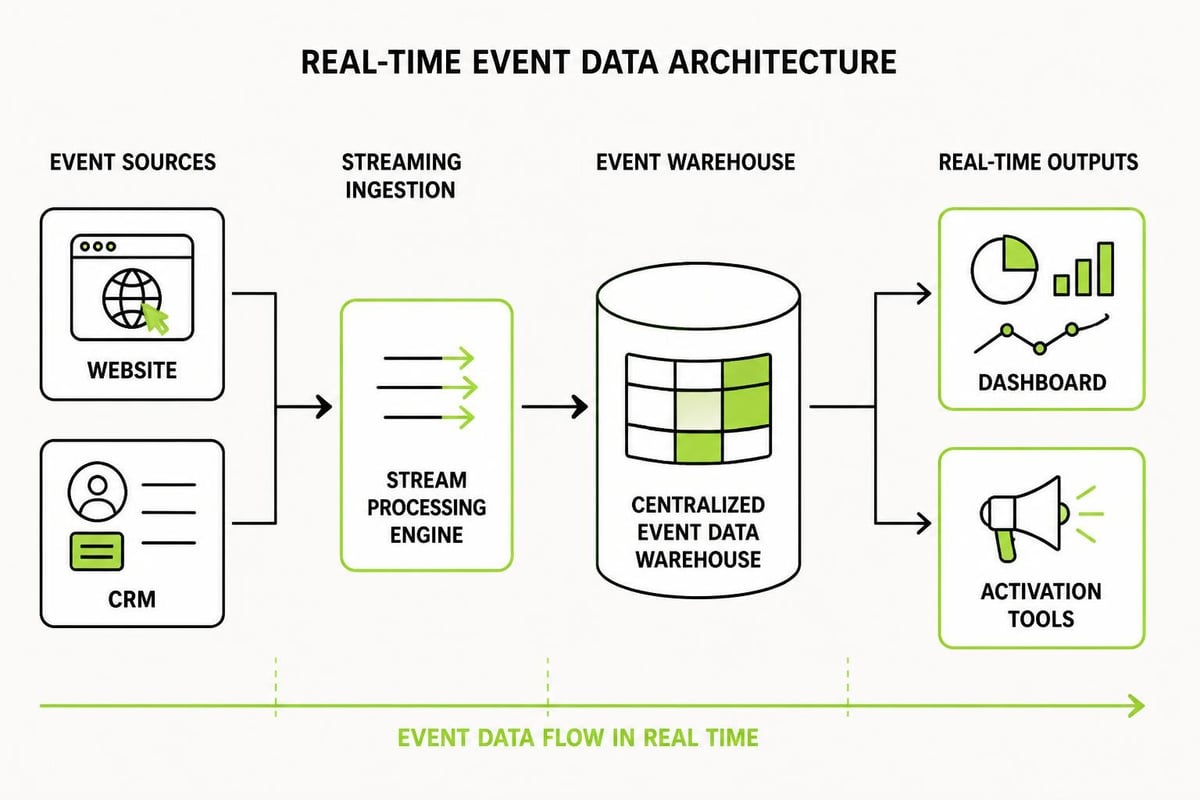
This is where real-time analytics patterns using streaming data become relevant. If you're running serious volume (tens of thousands of visitors monthly, multiple campaigns, complex funnels), batch processing isn't fast enough.
Real-time pipelines let you:
- Personalise website content based on current session behaviour
- Trigger automations within seconds of an action
- Update dashboards live as conversions happen
- Feed ML models with fresh data for better predictions
The architecture pattern typically looks like:
- Event sources (website, CRM, email, ads)
- Streaming ingestion (Kinesis, Kafka, Pub/Sub)
- Processing layer (Lambda functions, transform scripts)
- Data warehouse (BigQuery, Snowflake, Redshift)
- Activation layer (BI tools, reverse ETL back to CRM/ads)
For service businesses just starting to scale with clarity, you don't need this on day one. But understanding the path helps you make architectural decisions now that don't box you in later.
Ethics, Bias, and Algorithmic Fairness
As code for marketing gets more sophisticated, especially with personalisation and recommendation engines, ethical concerns matter. Algorithms can encode bias, exclude groups, or optimise for short-term metrics that hurt long-term trust.
Research on algorithmic bias in recommender systems shows how easily ML models can amplify historical biases in training data. If your personalisation engine learns from past conversions, and past conversions skewed toward a specific demographic due to biased targeting, the model doubles down.
The fix is intentional:
- Audit training data for representation and balance
- Monitor outcomes across demographic segments
- Set fairness constraints (don't just optimise for conversion rate)
- Test edge cases (what happens to users outside your core segments?)
- Document decisions (why does the algorithm do what it does?)
This isn't just ethics theatre. Biased code for marketing actively shrinks your addressable market and invites regulatory scrutiny. Build systems that work for everyone, not just the majority.
Building vs. Buying
Most businesses hit a decision point: do we build custom code for marketing in-house, or do we buy platforms that handle it?
The answer depends on complexity, volume, and strategic differentiation.
Buy when:
- Your needs are standard (lead capture, email automation, basic tracking)
- Volume is low to moderate (under 50,000 site visitors monthly)
- Speed matters more than customisation
- You don't have engineering resources in-house
Build when:
- Your process is unique and competitive advantage depends on it
- Volume is high enough that SaaS pricing becomes prohibitive
- You need control over data, logic, and user experience
- You have the team to maintain custom code long-term
For most service businesses, the right path is hybrid: use platforms for 80% of the work, write custom code for the 20% that differentiates. Don't build a CRM from scratch. Do write custom automation logic that matches your exact sales process.
Common Implementation Patterns
Here are a few battle-tested patterns for code for marketing that work across industries:
Pattern 1: Progressive Profiling
Instead of asking for all information upfront, collect data over time:
- First visit: email only
- Second interaction: name + company
- Third touchpoint: role + team size
- Later: budget, timeline, specific pain points
Each form is shorter. Conversion rates stay higher. Your CRM builds a complete profile gradually.
Pattern 2: Behaviour-Based Segmentation
Tag leads based on actions, not demographics:
- Downloaded pricing guide → tag: pricing-aware
- Visited case studies 3+ times → tag: high-intent
- Opened email but didn't click → tag: passive-interest
- Watched demo video to completion → tag: product-qualified
These tags feed into automation rules, personalisation logic, and sales prioritisation.
Pattern 3: Reverse ETL for Activation
Once data lands in your warehouse, send it back to operational tools:
- High LTV predictions → push to CRM for VIP treatment
- Churn risk scores → trigger win-back campaigns
- Product usage data → personalise ad creative
- Engagement tiers → adjust email send frequency
This closes the loop. Code for marketing becomes a cycle, not a one-way pipeline.
Practical Next Steps
If you're starting from scratch or fixing a broken system, here's the sequence that works:
- Audit what you have (list every script, integration, automation currently running)
- Document the desired flow (what should happen when someone becomes a lead?)
- Fix tracking first (you can't improve what you can't measure)
- Add consent management (before you scale, get compliant)
- Build one automation (start with lead confirmation email, prove it works)
- Layer in testing (A/B test one element per month)
- Review and iterate (monthly check: what broke, what improved, what's next)
Most businesses skip the documentation step and regret it six months later when nobody remembers why a certain tag exists or what a random webhook does. Write it down. Future you will be grateful.
The businesses that grow predictably in 2026 are the ones that treat code for marketing like infrastructure, not magic. They understand the logic, control the data, and build systems that compound. It's not flashy work, but it's the work that lasts.
Code for marketing is the hidden structure underneath every campaign that scales. When it's built right, your tracking is accurate, your automations run cleanly, and your data tells a story you can act on. At MDO Digital, we build this kind of infrastructure for service businesses ready to remove chaos and create growth that compounds. If your marketing feels scattered or your systems don't connect, let's fix that.