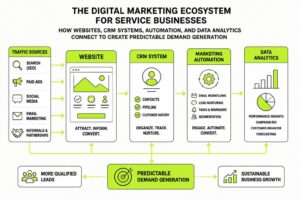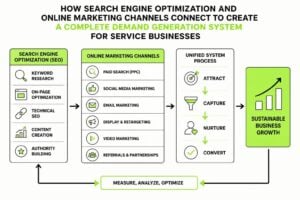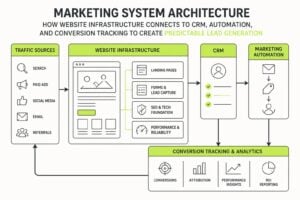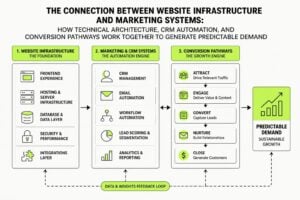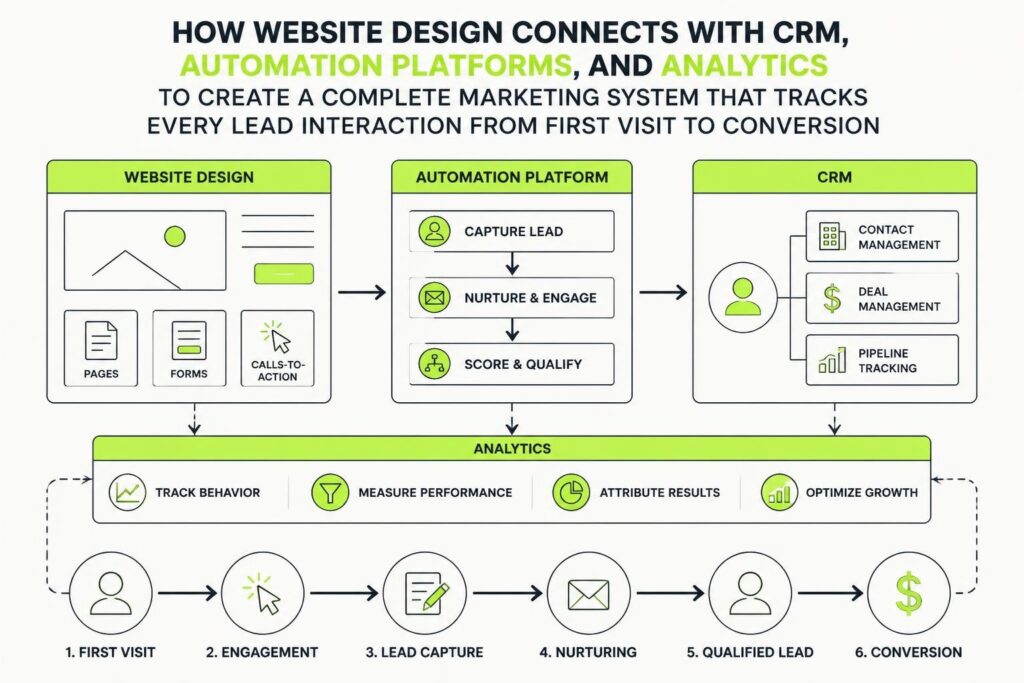
A website that looks good but doesn't talk to your marketing systems is like having a shopfront with no back door. Visitors come in, poke around, and leave. You've got no record of who they were, what they wanted, or how to follow up. Website design integrated with marketing systems fixes this. It connects your site to your CRM, automation tools, and analytics so every visitor becomes trackable, every lead gets captured properly, and every conversion feeds back into your growth engine. For service businesses trying to scale, this integration isn't optional anymore. It's the difference between guessing and knowing.
Why Website Design and Marketing Systems Need to Work Together
Most businesses treat their website and marketing tools as separate projects. The designer builds something attractive. The marketing team bolts on forms and tracking codes later. This approach creates gaps. Forms that don't capture enough data. Leads that vanish between systems. Attribution that gets lost. No clarity on what's actually working.
When you design with systems integration from the start, the website becomes part of your marketing infrastructure. Every page, form, and interaction is built to feed data where it needs to go. This means:
- Lead capture connects directly to your CRM without manual imports
- Attribution tracking follows visitors from first click to closed deal
- Automation triggers fire based on actual website behavior
- Sales teams see full context before they pick up the phone
- Marketing reports show real ROI, not just vanity metrics
Website design integrated with marketing systems turns your site into a lead generation machine that actually talks to the rest of your business. The design still matters, but it's designed for function as much as form. Connecting website behavior with CRM usage gives sales teams the full story and lets marketing track performance through the entire funnel, not just to the form submit.
Forms That Actually Feed Your Pipeline
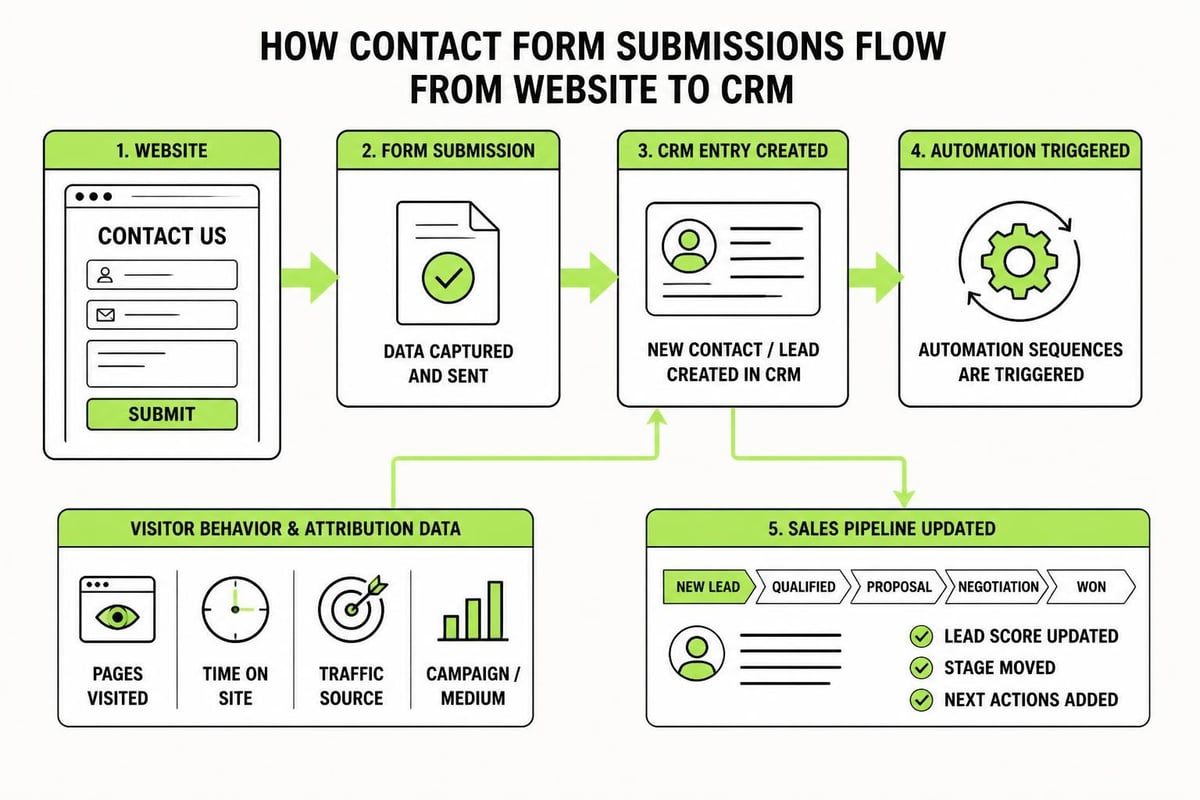
Forms are where most integration falls apart. A visitor fills out a contact form. It emails someone. That someone manually adds it to the CRM. Half the context is lost. Attribution is gone. Follow-up is slow.
Properly integrated forms capture everything you need and send it straight to your system. This includes:
- Contact details (name, email, phone)
- Lead source and campaign attribution (UTM parameters, referrer, landing page)
- Behavioral data (pages visited, content downloaded, time on site)
- Custom fields specific to your sales process (project timeline, budget, service interest)
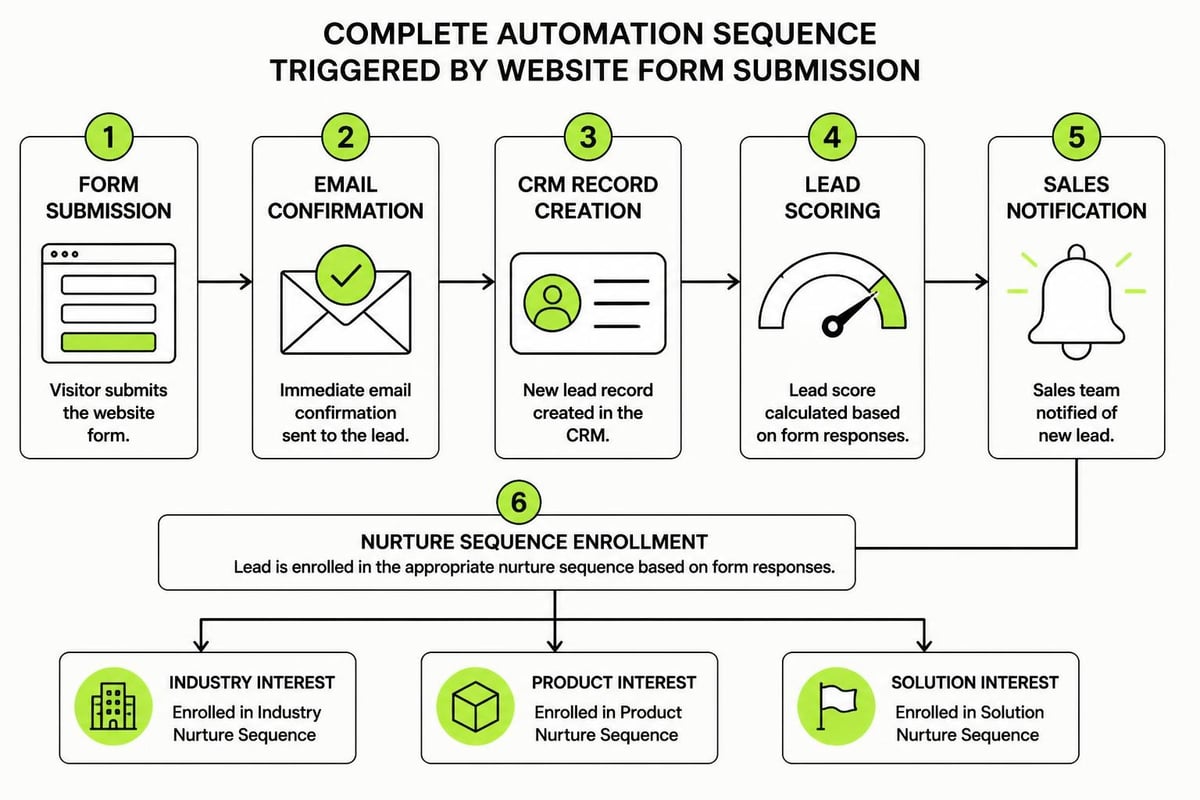
The form submission creates a contact record in your CRM instantly. It triggers automation sequences based on what they asked for. It assigns the lead to the right salesperson based on territory or service line. It logs the interaction so nothing gets forgotten.
This level of integration requires planning during the design phase. You need to know what data matters, where it needs to go, and how your sales team will use it. Planning CRM integration from the start means building forms, fields, and workflows that align with your backend systems, not retrofitting them later.
Building Reliable Integration That Actually Works
Integration isn't just about connecting tools. It's about making sure data flows reliably, accurately, and consistently. A form that works 95% of the time means you lose 1 in 20 leads. That's not acceptable.
Reliable website design integrated with marketing systems needs these pieces:
Field Mapping and Data Structure
Your website form fields need to map cleanly to your CRM fields. If your form asks for "Company Name" but your CRM stores it as "Organization," that mismatch breaks automation. Plan your data structure first. Make sure every field has a purpose and a destination.
| Website Field | CRM Field | Use Case |
|---|---|---|
| First Name | first_name | Personalization in emails |
| Primary contact, automation triggers | ||
| Company | company_name | Account matching, firmographics |
| UTM Source | lead_source | Attribution reporting |
| Page URL | conversion_page | Behavior tracking |
Error Handling and Retry Logic
Networks fail. APIs go down. Systems timeout. Your integration needs to handle this gracefully. If a form submission fails to reach your CRM, it should retry automatically. It should log the error. It should alert someone if retries fail.
Most off-the-shelf website builders don't handle this well. Reliable CRM integration requires proper error handling, including retry logic, logging, and acceptance testing to catch issues before they lose leads. This is where custom development or purpose-built integration platforms earn their keep.
Consent and Compliance
Every lead capture needs proper consent handling. GDPR, Australian Privacy Principles, and industry regulations require clear opt-ins. Your forms need to capture consent status and pass it to your CRM. Your automation needs to respect it. Your design needs to make it clear and simple.
A checkbox that says "I agree to receive marketing emails" isn't enough. You need to log when they agreed, what they agreed to, and make it easy for them to withdraw consent later. This all needs to flow through your systems automatically.
Tracking Attribution Through the Entire Journey
One of the biggest wins from website design integrated with marketing systems is proper attribution. Most businesses only track the last click. Someone fills out a form, you see they came from Google, and you call it an organic lead. But they might have clicked three ads, read five blog posts, and downloaded two guides before they converted. Without proper tracking, you're flying blind.
UTM Parameters and First-Touch Tracking
UTM parameters tag every marketing link with source, medium, campaign, and content details. When someone clicks a link, those parameters travel with them. Your website needs to capture them and store them (usually in a cookie or session).
When they eventually convert, your form submission includes:
- First-touch attribution (how they first found you)
- Last-touch attribution (what triggered the conversion)
- All campaign touchpoints in between
This data flows into your CRM. Now your sales team knows this lead came from a LinkedIn ad six weeks ago, read four blog posts, and finally converted after downloading a guide. That context changes the conversation entirely.
Behavioral Tracking and Lead Scoring
Beyond just capturing form data, integrated systems can track website behavior and score leads automatically. Someone who visits your pricing page five times and downloads three case studies is hotter than someone who read one blog post. Your CRM should know this before sales reaches out.
Website design integrated with marketing systems can trigger automation based on behavior:
- High-value page visits (pricing, services, case studies) increase lead score
- Repeat visits trigger nurture emails
- Specific content downloads assign leads to relevant campaigns
- Time on site and engagement help prioritize sales outreach
This is where the benefits of integrating CRM with marketing automation become clear. Your website isn't just a brochure. It's an active participant in your sales process, feeding intelligence back to your team in real time.
Designing the User Experience Around System Needs
Here's where it gets tricky. You need integration, but you can't sacrifice user experience. Forms that ask for 15 fields don't convert well. Pop-ups that interrupt every page annoy people. Tracking that slows down your site kills conversions.
The design challenge is balancing what your systems need with what your visitors will tolerate. Good website design integrated with marketing systems finds that balance through:
Progressive Profiling
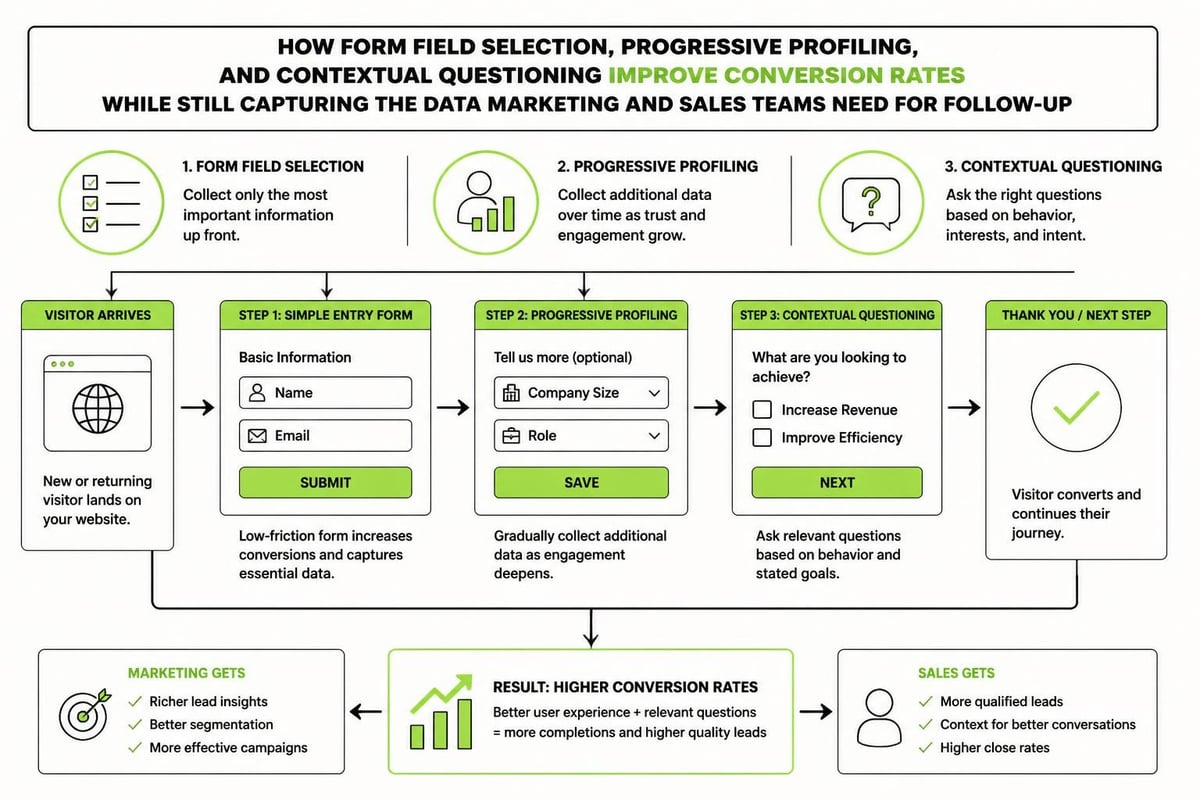
Instead of asking for everything upfront, capture basic details first and fill in the gaps over time. First form asks for name and email. Next interaction asks for company and role. Third touchpoint gets budget and timeline. Your CRM builds a complete profile gradually without overwhelming anyone.
This requires smart automation. Your forms need to know what data you already have and only ask for what's missing. Your CRM needs to merge records and update fields cleanly.
Contextual Form Fields
Show different fields based on what someone's looking at. A pricing page form might ask about budget and timeline. A blog subscription only asks for email. A demo request captures company size and current tools. The fields match the intent.
This makes forms feel relevant instead of generic. It also captures better data because you're asking the right questions at the right time.
Performance and Speed
All this tracking, scripting, and integration can slow down your site. Slow sites lose conversions fast. Your design needs to load tracking asynchronously, optimize scripts, and keep page speed high. There's no point capturing perfect data if half your visitors bounce before the page loads.
Common Integration Approaches and What Works
There are several ways to connect your website to marketing systems. Each has trade-offs. The right choice depends on your tools, budget, technical capability, and complexity needs.
Native Platform Integrations
Most website platforms (WordPress, Webflow, HubSpot) and CRMs (Salesforce, HubSpot, ActiveCampaign) offer native integrations. These are the easiest to set up. You install a plugin, connect your account, map a few fields, and you're done.
Pros:
- Quick to implement
- Usually reliable
- Support from both platforms
- No custom development needed
Cons:
- Limited customization
- Can't handle complex logic
- May not sync all data you need
- Dependent on platform updates
Third-Party Integration Platforms
Tools like Zapier, Make, and Integromat sit between your website and CRM. They handle the data transfer, mapping, and logic without custom code.
Pros:
- More flexibility than native integrations
- Can connect almost any tools
- Visual workflow builders
- Error handling and retry built in
Cons:
- Monthly costs based on volume
- Can introduce delays (some aren't real-time)
- Still limited by what the platforms expose
- Another dependency to manage
Custom API Integrations
For complex needs or unique systems, custom integrations use APIs to connect your website directly to your CRM and automation tools. This requires development work but gives you complete control.
Pros:
- Total flexibility in what data flows where
- Real-time, reliable syncing
- Custom business logic
- No limits on complexity
Cons:
- Higher upfront cost
- Requires technical expertise
- Ongoing maintenance needed
- More to break if not built well
| Approach | Best For | Cost | Flexibility | Reliability |
|---|---|---|---|---|
| Native | Simple setups, single platform ecosystems | Low | Low | High |
| Third-party | Mid-complexity, multiple tools | Medium | Medium | Medium |
| Custom API | Complex workflows, unique requirements | High | High | High (if done right) |
Most businesses start with native integrations and graduate to custom work as their needs grow. There's no shame in using Zapier if it does the job. Just make sure whatever approach you choose, it's built with proper field mapping, consent handling, and error retry logic so you don't lose leads when something inevitably goes wrong.
What This Looks Like in Practice
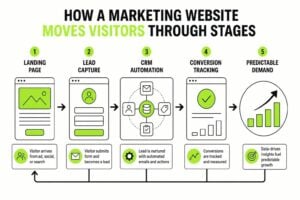
Let's walk through how website design integrated with marketing systems works for a service business running paid ads and content marketing.
Step 1: Visitor arrives from a LinkedIn ad
The ad URL includes UTM parameters (utm_source=linkedin, utm_medium=paid, utm_campaign=Q3-Lead-Gen). When they land on the website, a script captures these parameters and stores them in a cookie.
Step 2: They browse the site
They read a blog post, visit the services page, and check out a case study. Each page view is tracked. Your CRM (via a tracking pixel or script) now has a profile of an anonymous visitor with these interests.
Step 3: They download a lead magnet
They hit a landing page offering a guide. The form asks for name, email, and company. Behind the scenes, the form also captures the UTM parameters from step one and the pages they visited in step two. When they submit, all this data flows into your CRM as a new contact record.
Step 4: Automation kicks in
The CRM immediately sends a confirmation email with the guide. It enrolls them in a nurture sequence. It assigns them to a sales rep based on company size or industry. It creates a task for follow-up in three days if they don't engage with the next two emails.
Step 5: They return and request a demo
A week later, they come back (via a nurture email link) and fill out a demo request form. This time, the form only asks for phone number and availability (you already have their name, email, and company). The CRM updates their existing record, changes their lifecycle stage to "Sales Qualified Lead," and notifies the assigned rep immediately.
Step 6: Sales calls with full context
When the rep opens their CRM before the call, they see the entire journey. LinkedIn ad click six weeks ago. Three blog posts read. Guide downloaded. Two nurture emails opened. Services and case study pages viewed. Demo requested. The rep doesn't go in cold. They know exactly what this lead cares about.
That's website design integrated with marketing systems working properly. Every touchpoint feeds the next. Nothing gets lost. Everyone has context. A structured approach like building a marketing funnel ties all these pieces together into a repeatable system that scales.
We've built this exact infrastructure for clients who were drowning in spreadsheets and lost leads. The 7-Step Marketing Plan framework walks through how to structure this system from setting goals through generating referrals, with each step feeding into the next to create predictable, compounding growth.

Ongoing Maintenance and Optimization
Integration isn't a one-time project. Your tools update. Your business changes. New data needs emerge. Your website and marketing systems need ongoing attention to stay aligned.
Regular Audits
Every quarter, check that:
- Forms are submitting to the right places (test each form manually)
- Data is mapping correctly (spot-check new leads in your CRM)
- Automation sequences are firing (review workflow logs)
- Attribution is capturing properly (verify UTM parameters are flowing through)
- No leads are falling through cracks (compare form submissions to CRM records)
This catches issues before they cost you leads. Most integration problems are silent. Forms break, data stops flowing, but no one notices for weeks because there's no obvious error message. Regular testing prevents this.
Performance Monitoring
Track how integration affects your site performance. Too many scripts slow things down. Heavy tracking code kills mobile experience. Monitor page speed, form conversion rates, and bounce rates. If integration is hurting performance, optimize or rethink your approach.
Data Hygiene
More data flowing means more opportunities for junk to pile up. Duplicate records, incomplete fields, outdated information. Set up processes to clean your CRM regularly. Merge duplicates. Update outdated records. Archive old leads. Clean data makes automation work better and gives sales teams confidence in what they're seeing.
Investment and Return
Website design integrated with marketing systems costs more upfront than a basic site. Custom development, platform fees, and ongoing maintenance add up. But the return is worth it if you're serious about scaling.
Consider what you're paying for lost leads right now. Every form that breaks costs you a potential client. Every lead without attribution wastes ad spend. Every sales call that starts cold takes longer to close. Add it up and the cost of not integrating is often higher than the investment to do it right.
Most service businesses see ROI within six months through:
- Higher conversion rates (better forms, faster follow-up)
- More efficient ad spend (attribution shows what actually works)
- Shorter sales cycles (sales has context, not cold outreach)
- Increased deal size (better lead scoring means you focus on qualified leads)
- Scalable growth (systems handle volume without adding headcount)
The key is treating your website as infrastructure, not a project. It's part of your marketing and sales engine. You wouldn't run a business without a CRM. You shouldn't run marketing without proper integration between your website and that CRM.
Technical Considerations for Implementation
If you're planning to build or rebuild with integration in mind, here are the technical pieces you'll need to address:
API Access and Documentation
Make sure your CRM and automation tools have robust APIs. Read the documentation. Understand rate limits, authentication methods, and webhook capabilities. Some tools lock features behind higher-tier plans. Know this before you commit to a platform.
Security and Data Protection
Any integration that moves contact data needs proper security. Use HTTPS everywhere. Encrypt sensitive data. Store API keys securely (not in your website code). Follow best practices for data handling. A breach isn't just embarrassing; it's expensive and damages trust permanently.
Scalability
Will your integration handle 10 leads a day? 100? 1,000? Some approaches that work at small scale break under volume. Plan for growth. Test under load. Make sure your systems can handle success without melting down.
Developer Handoff and Documentation
If you're working with a developer or agency, make sure they document everything. How data flows. What triggers what. Where credentials are stored. What to do when something breaks. Without documentation, you're dependent on whoever built it. You want to own your systems, not rent them.
Website design integrated with marketing systems turns your site from a passive brochure into an active growth engine. When every lead is captured properly, tracked accurately, and followed up systematically, you stop guessing and start scaling with clarity. If you're ready to build infrastructure that removes chaos, protects leads, and creates predictable demand, MDO Digital can help you design and implement systems that actually work. Let's build something that compounds over time.