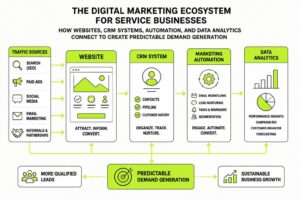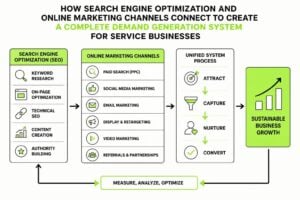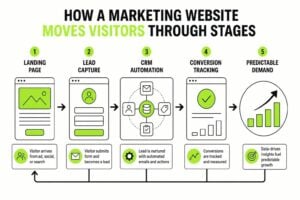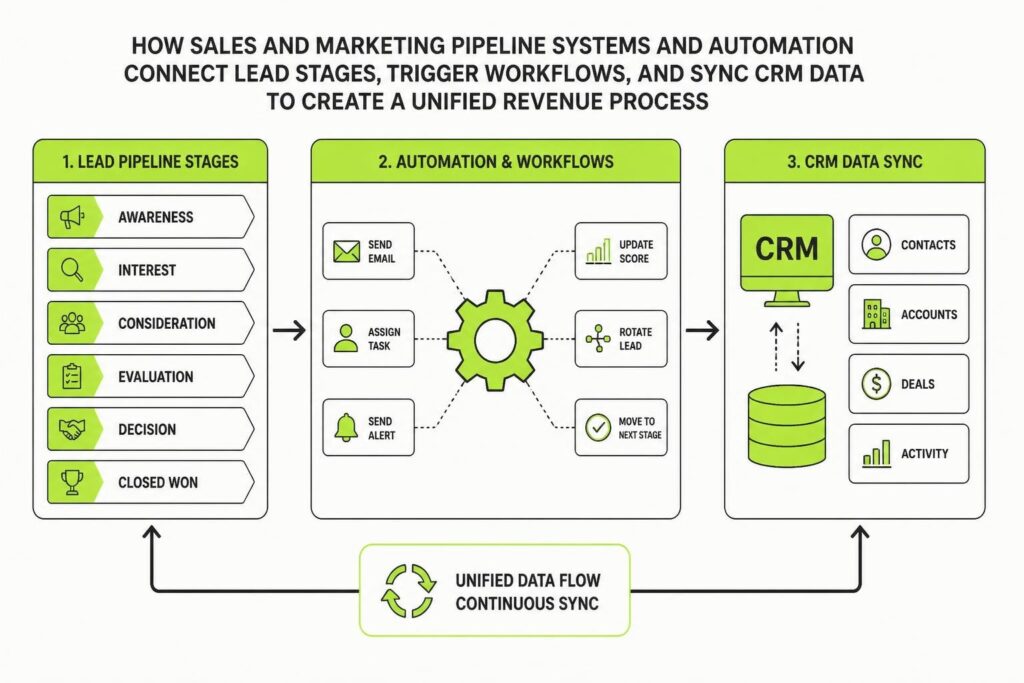
Most service businesses lose leads in the gap between marketing activity and sales follow-up. Someone fills out a form, downloads a resource, or books a call, and then silence. No automated acknowledgment. No structured handoff. No clear next step. The result is wasted ad spend, frustrated prospects, and revenue that slips through the cracks. Sales and marketing pipeline systems and automation exist to close that gap. They create a connected workflow where every lead is captured, qualified, routed, and nurtured without manual effort. When done right, automation doesn't replace human judgment. It protects it by removing chaos and letting your team focus on conversations that matter.
What Sales and Marketing Pipeline Systems and Automation Actually Do
Sales and marketing pipeline systems and automation turn disconnected tools into a single, structured process. A pipeline system maps the journey from first contact to closed deal. Automation handles the repetitive tasks that move people through those stages.
Think of it this way. Marketing generates interest. Sales converts interest into revenue. Automation makes sure nothing falls between the two.
Here's what a functioning system handles:
- Lead capture from forms, ads, website visits, and email campaigns
- Segmentation and scoring based on behavior, demographics, and engagement
- Automated follow-up through email sequences, SMS, or task triggers
- Sales handoff when a lead reaches a qualification threshold
- Pipeline tracking so both teams see where every lead sits in real time
- Reporting and attribution to measure what's actually working
Without automation, someone has to manually tag contacts, send follow-ups, log activities, and remind the sales team to call. It's slow, inconsistent, and prone to human error. With automation, those actions happen instantly and reliably.
The Shift From Campaigns to Workflows
Traditional marketing runs in campaigns. You launch an ad, send an email blast, post on social, and hope something sticks. Each campaign is a separate event. There's no memory, no connection, no continuity.
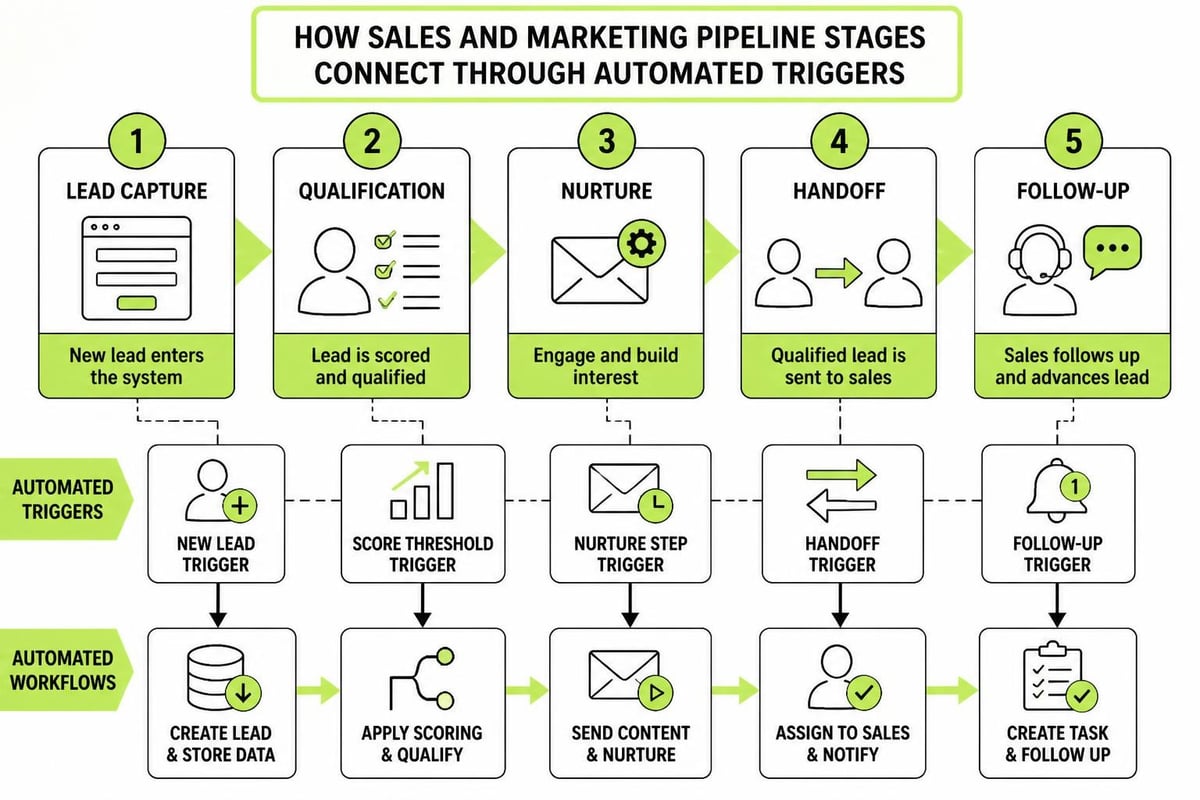
Sales and marketing pipeline systems and automation replace that fragmented approach with workflows. A workflow is a set of conditions and actions: if someone does X, then trigger Y. If they download a guide, send a follow-up email. If they visit your pricing page three times, notify the sales team. If they go cold for 30 days, move them to a re-engagement sequence.
Workflows create a feedback loop. Marketing nurtures leads until they show buying signals. Sales picks up the conversation at the right moment. If the deal doesn't close, the lead loops back into marketing for further nurturing. Nothing is lost. Everything is tracked.
This is what Forrester calls revenue process transformation. It's not just about generating more leads. It's about orchestrating the entire lifecycle so marketing and sales work as one engine.
How to Build a Sales and Marketing Pipeline System
Building sales and marketing pipeline systems and automation starts with mapping your current process, even if it's messy. You need to know where leads come from, what happens to them, and where they get stuck.
Step 1: Define Your Pipeline Stages
Your pipeline should reflect the real journey your buyers take. Most service businesses use some version of this structure:
| Stage | Marketing Focus | Sales Focus |
|---|---|---|
| Awareness | Traffic, content, ads | No involvement |
| Interest | Lead magnets, webinars | No involvement |
| Consideration | Email nurture, case studies | Initial outreach |
| Intent | Demo requests, pricing inquiries | Active conversation |
| Decision | Proposal follow-up | Negotiation and close |
| Customer | Onboarding, retention | Account management |
Each stage has different actions, different messaging, and different automation needs. A lead in the awareness stage shouldn't get a sales call. A lead requesting a demo shouldn't sit in a 12-week nurture sequence.
Step 2: Map Lead Sources and Entry Points
Every lead enters your system somewhere. Website forms. Google Ads. LinkedIn messages. Referrals. Partner integrations. Each source needs a capture mechanism and an automated response.
For example, someone who downloads a guide from your website should:
- Receive an immediate email with the download link
- Get tagged in your CRM as "guide downloaded"
- Enter a nurture sequence tailored to that topic
- Trigger a notification if they visit high-intent pages later
If you're running paid ads, the workflow changes. Ad leads often need faster follow-up because they're warmer and more expensive. An automated SMS or same-day sales task can make the difference between a booked call and a wasted click.
Step 3: Set Up Lead Scoring and Qualification
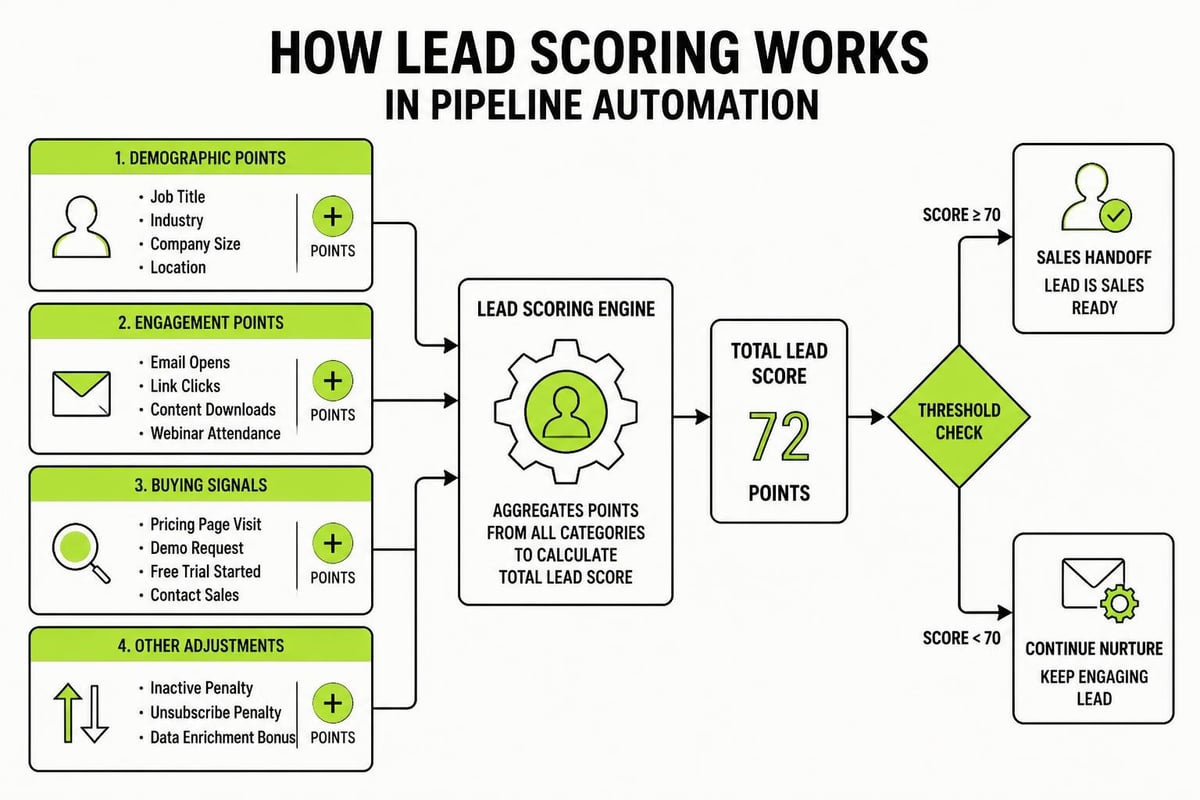
Not every lead is ready to buy. Lead scoring assigns points based on actions and attributes. High scores indicate buying intent. Low scores mean they need more nurturing.
Common scoring criteria:
- Demographic fit: Industry, company size, role, location
- Engagement level: Email opens, page visits, content downloads
- Buying signals: Pricing page visits, demo requests, competitor comparisons
- Recency: Recent activity scores higher than old activity
When a lead crosses a threshold (say, 50 points), automation triggers a sales handoff. The rep gets a notification. The lead gets a personalized email. The pipeline updates. No one has to remember or chase.
Step 4: Build Nurture Sequences for Each Stage
Sales and marketing pipeline systems and automation depend on nurture sequences to keep leads engaged without burning out your team. A nurture sequence is a series of emails (or other touchpoints) sent automatically over time.
Each sequence should match the lead's stage and intent:
- Top of funnel: Educational content, blog posts, guides
- Middle of funnel: Case studies, comparison content, webinars
- Bottom of funnel: Testimonials, pricing info, demo invitations
Sequences should also have exit conditions. If someone books a call, they exit the nurture sequence and enter a sales-specific workflow. If they unsubscribe or go completely cold, they move to a dormant list or re-engagement campaign.
Step 5: Automate the Sales Handoff
The moment marketing qualifies a lead, sales needs to know. This is where most systems break down. Marketing declares a lead "qualified," but no one follows up. Or sales gets a list of cold contacts with no context.
Automation fixes this. When a lead scores high enough, the system:
- Sends an alert to the assigned sales rep
- Creates a task in the CRM with lead details and activity history
- Logs the handoff date and source for attribution
- Optionally, sends the lead a booking link or intro email
Aligning sales and marketing through shared systems eliminates the "we sent you leads" vs. "those weren't real leads" argument. Both teams see the same data. Both teams follow the same process.
Choosing the Right Tools for Sales and Marketing Pipeline Systems and Automation
You don't need a dozen tools. You need a CRM that handles contacts, deals, tasks, and automation in one place. Most service businesses do well with platforms like HubSpot, ActiveCampaign, Pipedrive, or Keap.
What matters more than the tool is how you configure it. A CRM is just a database. Automation is just logic. The structure you build on top determines whether it's useful or just more software clutter.
Key Features to Prioritize
| Feature | Why It Matters |
|---|---|
| Contact and deal pipelines | Separate views for marketing leads and sales opportunities |
| Behavior-based triggers | Actions fire based on what people do, not just time delays |
| Email and SMS automation | Multi-channel nurture without manual sends |
| Task and notification system | Sales reps get reminded without micromanagement |
| Reporting and attribution | Track ROI and optimize what's working |
| Integration with ad platforms | Sync lead data from Google, Facebook, LinkedIn |
You also need to integrate your website forms, landing pages, and email platform. If data doesn't flow automatically between systems, you're back to manual entry and spreadsheets.
For service businesses, building a marketing funnel means connecting every touchpoint to your CRM so you can see the full picture. A missed form submission or a broken integration can cost thousands in lost opportunities.
Common Mistakes to Avoid
Even with the right tools, sales and marketing pipeline systems and automation can fail if the setup is flawed. Here's what to watch for:
- Over-automation: Sending five emails in three days feels robotic and desperate
- Under-segmentation: One-size-fits-all sequences ignore buying stage and intent
- No human touchpoints: Automation should enable conversations, not replace them
- Ignoring data hygiene: Duplicate contacts, outdated info, and bad tagging break workflows
- Set-and-forget mentality: Automation needs regular audits and optimization
TechTarget’s marketing automation best practices emphasize testing, personalization, and iterative improvement. You won't get it perfect on day one. Build the foundation, launch, measure, and refine.
How Automation Compounds Over Time
The real value of sales and marketing pipeline systems and automation isn't immediate. It's cumulative. Every lead captured, every follow-up sent, every stage transition logged builds a dataset. That dataset tells you what works, where people drop off, and how to improve.
After a few months, you'll see patterns. Leads from LinkedIn convert better than leads from Google. People who watch your webinar are three times more likely to book a call. Deals that stall in the proposal stage need a different follow-up sequence.
You can't see those patterns without a system. And you can't act on them without automation.
The Flywheel Effect
Once your pipeline system is running, it creates a flywheel. Marketing generates leads. Automation nurtures and qualifies them. Sales converts the best ones. Revenue funds more marketing. The cycle repeats, faster and more efficiently each time.
The 7-Step Marketing Plan is built around this idea: each step feeds the next, creating a repeatable system that generates leads and clients predictably. When you pair that framework with automation, you're not just running campaigns. You're building infrastructure that scales.
Automation also protects you from team turnover. If your sales process lives in someone's head, you lose it when they leave. If it's built into your CRM, it keeps running regardless of who's on the team.
How sales and marketing pipeline automation creates a feedback loop: data capture, workflow triggers, conversion tracking, optimization, and increased efficiency over time
Measuring What Matters
Sales and marketing pipeline systems and automation give you more data than you know what to do with. The trick is focusing on metrics that drive decisions, not vanity numbers.
Pipeline Metrics to Track
- Lead volume by source: Where your best leads come from
- Conversion rate by stage: Where leads drop off or accelerate
- Time in stage: How long leads sit before moving or dying
- Sales cycle length: Days from first contact to closed deal
- Cost per lead and cost per acquisition: What you're paying for growth
- Revenue attribution: Which marketing efforts contributed to closed deals
If a stage has a low conversion rate, your messaging or qualification criteria might be off. If leads sit too long in one stage, automation or sales follow-up might be broken. If cost per lead is rising, your targeting or offer needs work.
Weekly pipeline reviews keep both teams aligned. You're not debating opinions. You're looking at data and adjusting the system.
Forrester’s analysis of revenue orchestration platforms highlights this shift. Automation isn't just about logging activities. It's about enabling smarter decisions, faster handoffs, and tighter alignment between marketing spend and revenue outcomes.
Making It Work for Service Businesses
Service businesses have longer sales cycles, higher deal values, and more relationship-dependent sales than ecommerce or SaaS. That means sales and marketing pipeline systems and automation need to support conversations, not replace them.
Automation should:
- Free up time for discovery calls and consultations
- Provide context so reps know what leads care about
- Keep leads warm during long decision cycles
- Surface buying signals so reps can prioritize the right people
It shouldn't feel like a bot. It should feel like a well-organized team that never forgets a follow-up.
For agencies, consultants, and professional services firms, trust is the bottleneck. Automation builds trust by being consistent, timely, and relevant. A lead who gets a helpful email the day after downloading your guide is more likely to take your call than one who hears nothing for two weeks.
You can explore more about marketing systems and infrastructure to see how other service businesses are building these processes.
The Role of Data Hygiene and Maintenance
Sales and marketing pipeline systems and automation only work if your data is clean. Duplicate contacts, missing fields, incorrect tags, and outdated info will break workflows and skew reports.
Set rules:
- Deduplication: Automatically merge duplicate contacts or flag them for review
- Required fields: Don't let contacts enter the system without key info
- Regular audits: Monthly review of contact lists, tags, and pipeline stages
- Sunsetting cold leads: Archive or delete contacts who haven't engaged in 12+ months
- Tag taxonomy: Use consistent naming conventions for tags, lists, and segments
Data hygiene isn't glamorous, but it's the difference between a system that works and one that becomes a mess six months in.
Sales and marketing pipeline systems and automation turn fragmented activity into structured growth. They protect leads, align teams, and create a process that compounds over time. For service businesses, the investment isn't in more software. It's in the infrastructure that makes everything else work. At MDO Digital, we build CRM and automation systems that remove chaos, protect leads, and create predictable demand. If you're ready to scale with clarity instead of guesswork, let's talk.