Most website projects fail before a single line of code is written. The problem isn't design talent or development skill. It's content. Or more accurately, the lack of structured thinking about content for website development before the build begins. When you treat content as an afterthought, you end up with beautiful templates filled with placeholder text, navigation structures that don't match how people actually think, and pages that look complete but say nothing useful. A website without planned content is just expensive scaffolding.
Why Content Comes First in Website Development
The traditional approach treats content as something you pour into a finished design. You build the site, create the pages, then scramble to fill them. This backwards process creates friction at every stage.
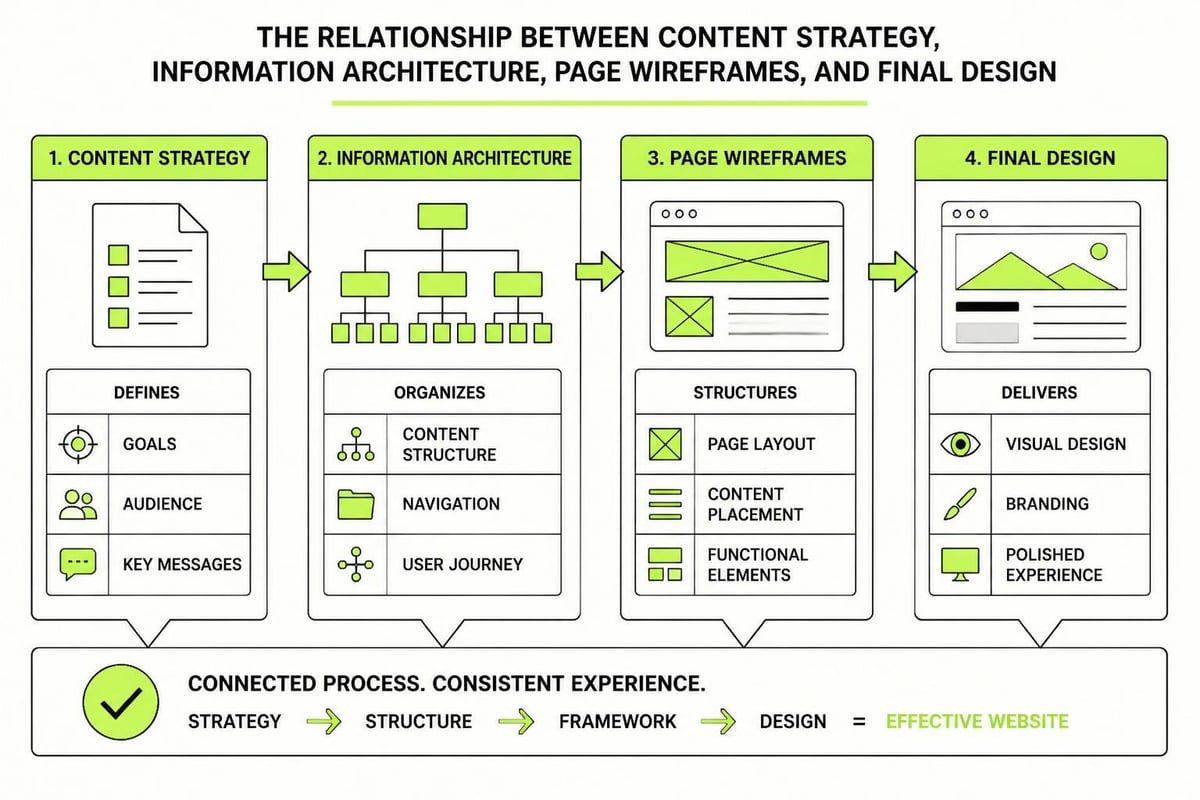
Design decisions need content context. How can you choose layout structures without knowing if you're working with 100 words or 1000? How do you plan navigation without understanding the actual topics and relationships between pages? You can't. So designers make assumptions, developers build to those assumptions, and then the content has to bend itself into shapes it was never meant to fit.
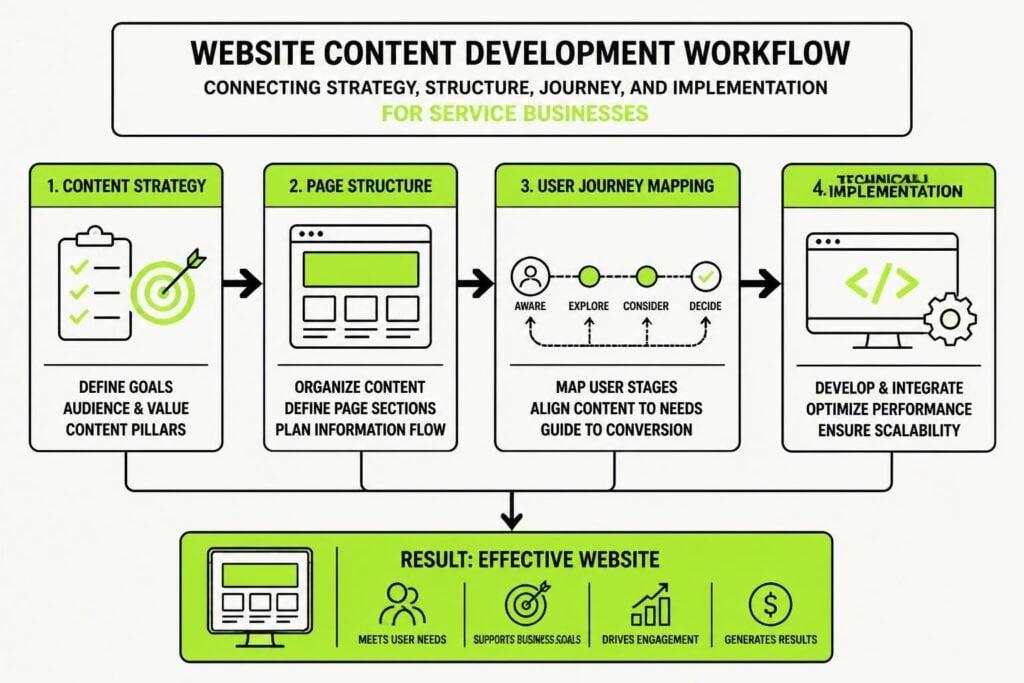
Content for website development shapes everything downstream. It determines:
- Page hierarchy and site structure
- Navigation labels and organization
- Form fields and conversion points
- Image requirements and visual direction
- Technical requirements for the CMS
When you start with content, you're making decisions based on what you actually need to communicate, not what looks good in a design comp. The University of Washington’s content strategy guide emphasizes this planning phase as critical for alignment between business goals and user needs.
Building Your Content Inventory
Before you write a single word, you need to know what content exists, what's missing, and what actually matters. This isn't about perfection. It's about clarity.
Start With What You Have
Most businesses already have content scattered across old websites, PDFs, presentations, and email templates. Gather it all. Create a simple spreadsheet with these columns:
| Content Type | Topic | Current Location | Quality Rating | Keep/Revise/Remove |
|---|---|---|---|---|
| Service page | CRM setup | Old website | Outdated | Revise |
| Blog post | Email marketing | Archive | Good | Keep |
| PDF guide | Lead scoring | Sales folder | Excellent | Keep |
This inventory tells you what you're working with. You'll find useful content that just needs updating, complete rubbish that should be deleted, and gaps where you need something new. The University of California’s development guide walks through this lifecycle management process in detail.
Map Content to User Journeys
People don't visit your website randomly. They arrive with questions, problems, and intentions. Your content for website development needs to match these journeys.
- Identify your primary user types. For most service businesses, this is prospects, current clients, and referral partners.
- Map their typical questions at each stage. Awareness, consideration, decision, post-purchase.
- Assign content pieces to each stage. What answers which question?
- Find the gaps. Where are people asking questions you're not answering?
This mapping exercise often reveals that you're creating content for the wrong stage. You might have five different service descriptions (decision stage) but nothing that educates prospects who don't yet understand their problem (awareness stage). Or you're heavy on blog posts but light on the practical guides people need when they're ready to choose.
Creating Content That Actually Works
Good content for website development isn't about word count or keyword density. It's about clear communication that moves people forward. Here's what actually matters.
Structure Before Style
Every piece of content needs a job. What is this page, section, or paragraph trying to accomplish? If you can't answer that in one sentence, you don't have clear enough thinking yet.
Use these structural elements consistently:
- Headings that communicate, not tease. "How We Price Projects" beats "Investment" every time.
- Front-loaded paragraphs. Put the point first, then support it. People scan.
- Lists for scannable information. If you're explaining steps, features, or options, use bullets or numbers.
- Tables for comparisons. When you're contrasting options or showing data, tables make it instantly digestible.
The web writing best practices from San Diego State University reinforce these fundamentals with a focus on clarity and audience engagement.
Write for Humans, Optimize for Search
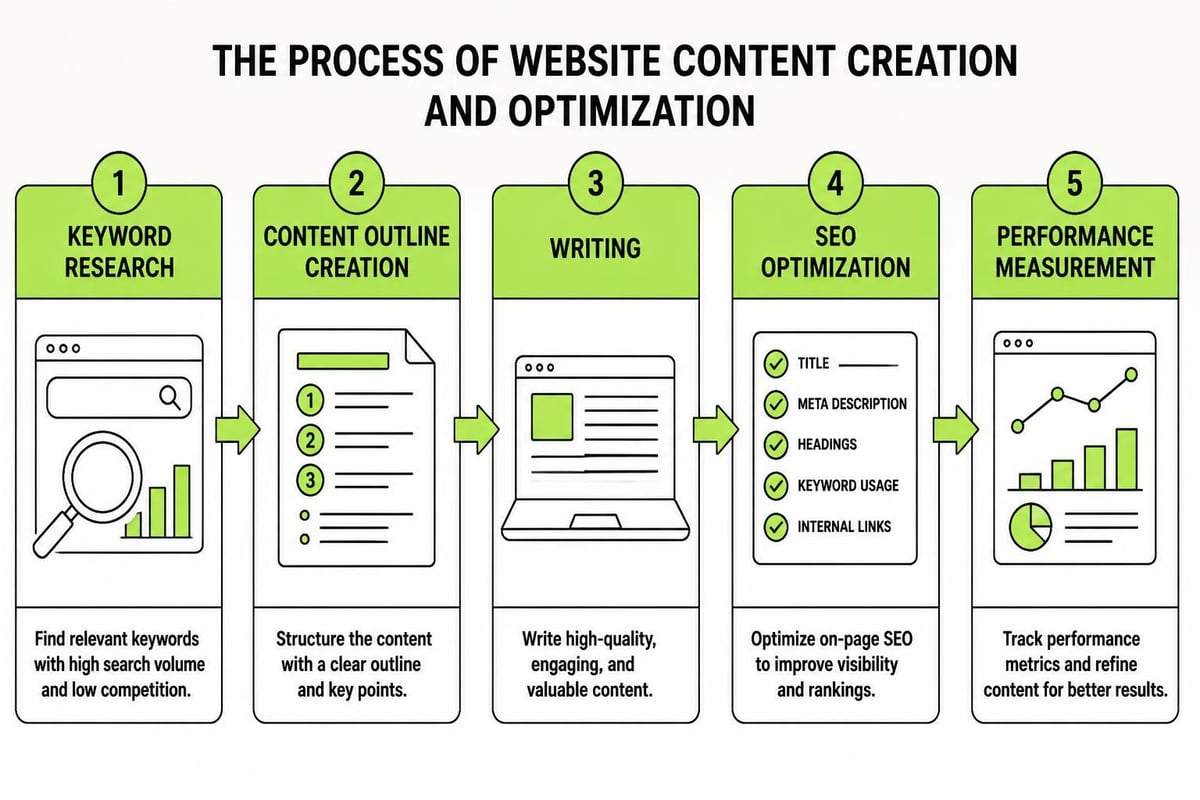
SEO matters, but not at the expense of readability. Your content for website development needs to satisfy both search engines and the people who actually read it. This means understanding search intent, not just keywords.
When someone searches for "CRM setup," what do they actually want? A definition? A tutorial? A service provider? Your content needs to match that intent. Google's gotten good at spotting content that's optimized for algorithms instead of humans. It doesn't rank well anymore.
Balancing technical SEO with quality writing involves:
- Using primary keywords in headings and opening paragraphs naturally
- Including related terms and variations throughout the content
- Structuring content with clear hierarchy (H2, H3, etc.)
- Writing descriptive meta information that actually helps people decide whether to click
The SEO best practices guide from Hallon Havre covers this balance in detail, particularly around aligning content with search intent while maintaining quality.
Content Types That Drive Website Performance
Different content serves different purposes. A high-converting website needs a mix of formats, each doing specific work. Here's what belongs in a well-structured site for service businesses.
Core Service Pages
These are your workhorses. They need to explain what you do, who it's for, how it works, and why someone should choose you. Most service pages fail because they're either too vague (trying to appeal to everyone) or too detailed (explaining process before establishing value).
A better structure:
- Problem statement. What challenge does this service solve?
- Your approach. How you solve it differently.
- Process overview. The high-level steps.
- Results and proof. What people can expect.
- Clear next step. One action to take.
Educational Content
Blog posts, guides, and resources build trust and attract organic traffic. But only if they're genuinely useful. Writing content for website development means understanding that educational content isn't about you. It's about giving people the information they need to make progress.
Skip the "5 Tips to Improve Your Marketing" posts that say nothing. Write the detailed guides that solve real problems. Show your thinking. Share your frameworks. MDO Digital’s approach to digital marketing demonstrates this principle with practical, implementation-focused content.
Conversion Points
Every piece of content should lead somewhere. Contact pages, quote request forms, resource downloads. These conversion points need their own content strategy. The copy around a form matters as much as the form fields themselves.
Elements that improve conversion rates:
- Clear value statement. What happens after they submit?
- Minimal friction. Only ask for what you actually need.
- Social proof nearby. Testimonials, client logos, results.
- Explicit privacy statement. People worry about what you'll do with their information.
Building effective conversion content is part of a structured marketing system. Having a clear framework that connects your content to your sales process makes everything more effective.
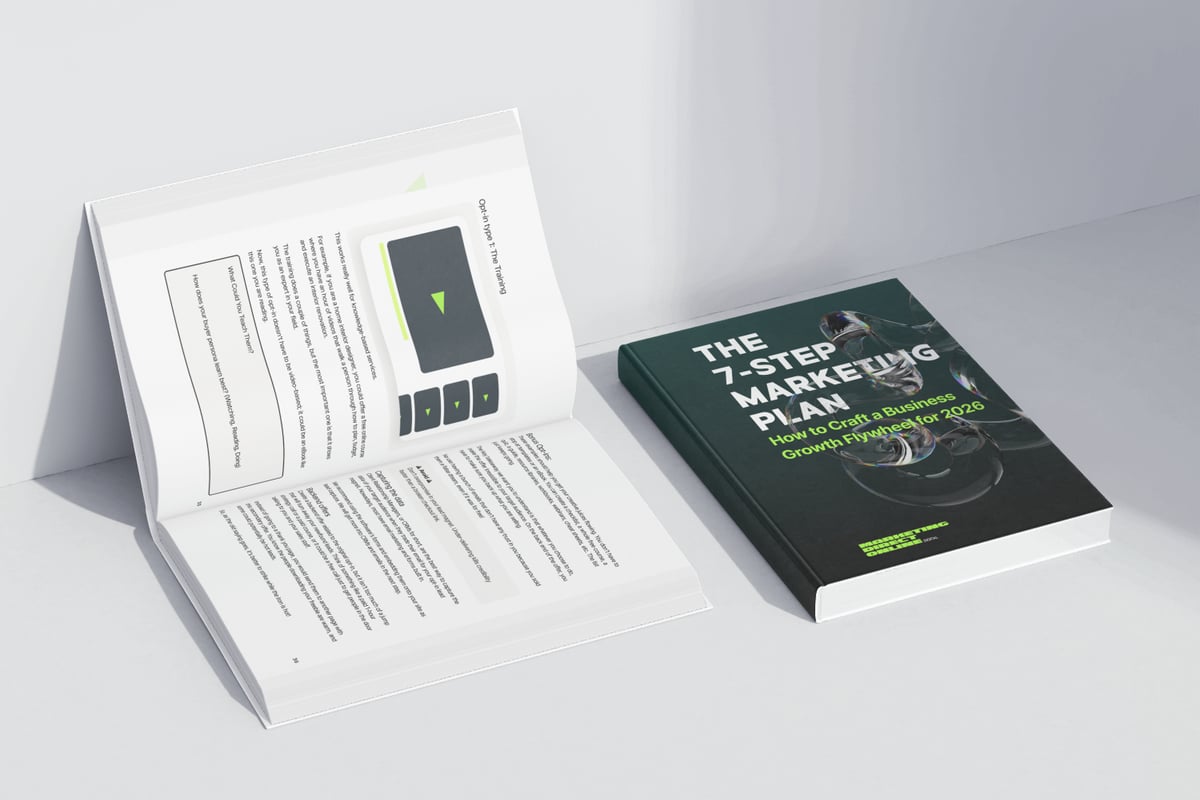
The 7-Step Marketing Plan provides exactly this kind of framework, showing how content fits into a repeatable system that generates consistent leads rather than random website traffic.
Technical Considerations for Content
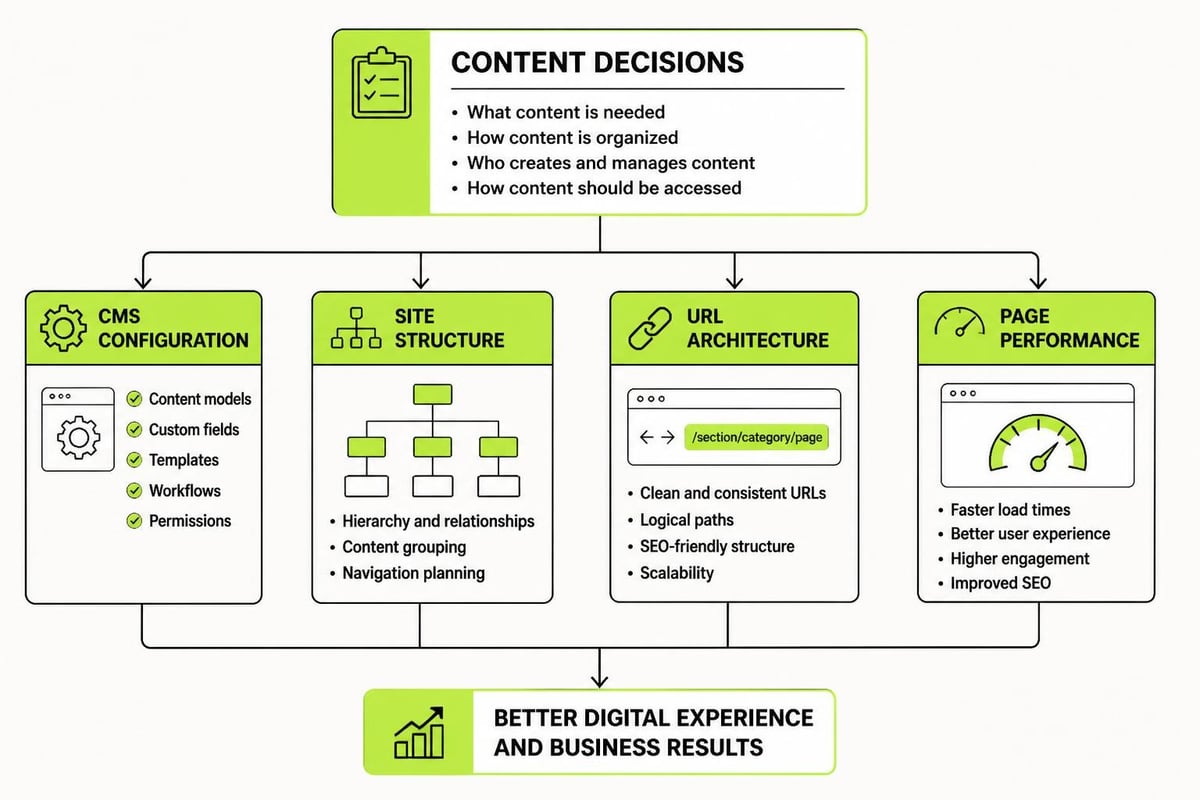
Content for website development isn't just words on a screen. It's structured data that needs to work within technical systems. Understanding these requirements upfront prevents expensive rebuilds later.
CMS Structure and Content Types
Your content management system needs to match how your content actually works. If you're publishing case studies, you need fields for client name, industry, challenge, solution, and results. If you're managing team bios, you need fields for name, role, photo, bio, and social links.
Many sites fail here by using a blog post format for everything. That works until you want to filter by industry, sort by service type, or display content in multiple layouts. Studio Ubique’s content strategy guide explains how content structure influences CMS decisions and overall project costs.
| Content Need | CMS Requirement | Why It Matters |
|---|---|---|
| Service pages | Custom post type with fields | Consistent structure, easy updates |
| Case studies | Taxonomies for filtering | Users can find relevant examples |
| Team bios | Repeater fields for credentials | Maintainable, scalable |
| Resources | Download tracking | Measure engagement, qualify leads |
Content Migration and Redirects
If you're replacing an existing website, you need a migration plan. What content moves over? What gets archived? What URLs need to redirect?
The migration process:
- Audit existing URLs and traffic data
- Map old URLs to new ones
- Set up 301 redirects for changed URLs
- Test every redirect before launch
- Monitor for 404 errors post-launch
Skipping this step loses search rankings and breaks external links. Not ideal.
Performance and Loading
Content affects site speed. Large images, embedded videos, excessive scripts. All of it adds weight. Your content for website development strategy needs to account for:
- Image optimization and responsive sizing
- Video hosting decisions (embedded vs. self-hosted)
- Font loading strategy
- Third-party script management
These technical details seem boring until your site loads slowly and people leave. Then they matter quite a bit.
Maintaining Content After Launch
Launch day isn't the end. It's the beginning of ongoing content work. Websites decay without maintenance. Links break. Information becomes outdated. New questions emerge that your content doesn't answer.
Content Governance
Who owns each piece of content? Who can edit it? Who approves changes? These questions need answers before they become problems. Create a simple governance document that establishes:
- Content owners by section. Marketing owns the blog, operations owns the process pages, leadership owns the about section.
- Review schedules. Service pages quarterly, blog posts as needed, legal pages when regulations change.
- Approval workflows. What needs sign-off versus what can be published directly.
- Brand guidelines. Tone, terminology, formatting standards.
Towson University’s writing guidelines offer a practical template for establishing these standards with an emphasis on conversational tone and readability.
Content Updates and Refreshes
Old content doesn't just sit there harmlessly. It actively hurts your site. Outdated information damages credibility. Broken examples confuse people. Statistics from 2022 make you look neglectful.
Build a refresh schedule:
- Review top-performing pages every six months
- Update statistics and examples annually
- Check external links quarterly
- Revise process descriptions when your methods change
- Archive or redirect obsolete content
This isn't busy work. It's maintaining the asset you've built. Understanding how marketing systems evolve helps you see content as part of a larger system that needs ongoing optimization, not a one-time project.
Content Collaboration Between Teams
Creating content for website development requires coordination between people who usually don't work together. Designers need content to inform layouts. Developers need it to build CMS structures. Marketers need it to drive results. Subject matter experts hold the knowledge but can't always articulate it clearly.
Setting Up Effective Workflows
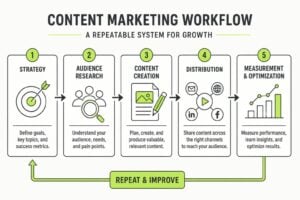
The best content workflows create clarity about who does what and when. Here's what works:
- Subject matter experts provide raw knowledge via interviews, brain dumps, or rough drafts
- Writers structure and refine the content for clarity and consistency
- Designers provide feedback on length, hierarchy, and visual needs
- Developers flag technical constraints that affect what's possible
- Stakeholders review and approve before content enters the build
Each handoff needs clear deliverables and deadlines. Vague requests create delays. "We need content for the services section" doesn't work. "We need 300-500 word descriptions for these five services by March 15" does.
Tools and Systems
Use tools that match your team's complexity. A small project might work fine in Google Docs. A larger site with multiple content creators needs something more structured.
Common options:
- Spreadsheets for content planning. Track status, owners, word counts, deadlines.
- Collaborative writing tools. Google Docs, Notion, Confluence.
- Project management platforms. Asana, Trello, Monday to track workflows.
- Staging environments. Where content gets reviewed in context before going live.
The tool matters less than the process. Pick something your team will actually use, then enforce the workflow consistently. Ten4’s insights on content strategy integration explore how content planning affects project timelines and team collaboration.
Measuring Content Performance
You can't improve what you don't measure. Content for website development needs performance metrics from day one. Not vanity metrics like page views. Actual indicators of whether your content is doing its job.
Key Metrics That Matter
| Metric | What It Tells You | How to Improve It |
|---|---|---|
| Time on page | Engagement level | Better content quality, clearer structure |
| Scroll depth | How much people read | Stronger openings, better formatting |
| Conversion rate | Whether content drives action | Clearer CTAs, better value proposition |
| Search rankings | Visibility for target terms | Better optimization, more relevant content |
| Bounce rate | Content relevance | Match search intent, improve page speed |
Track these monthly. Look for patterns. Which pages perform well? Which ones don't? What topics drive the most engagement? Where do people leave?
Using Data to Inform Updates
Analytics reveal what's working and what isn't. A page with high traffic but low engagement needs better content. A page with low traffic but high conversion needs better promotion. A page that ranks well but doesn't convert needs a stronger call to action.
Make data-driven decisions:
- Double down on topics that perform well
- Revise or remove content that doesn't get traction
- Expand successful formats
- Test different approaches on underperforming pages
This iterative approach treats your website as a living system, not a static brochure. Building marketing systems that adapt based on performance data is how you create compounding growth rather than one-time wins.
Common Content Mistakes to Avoid
Even with good intentions, most website projects make predictable content mistakes. Here are the ones that cause the most damage and how to avoid them.
Writing for Yourself Instead of Users
Your internal jargon makes perfect sense to you. To everyone else, it's confusing noise. Terms like "holistic solutions," "synergistic approach," or "best-in-class platforms" mean nothing. They're filler that makes you sound like everyone else.
Write how your customers talk. Use their words, their problems, their goals. If you wouldn't say it in a conversation, don't write it on your website.
Treating All Content the Same
A homepage needs different content than a pricing page. A service description works differently than a blog post. Each has a job to do and an audience to serve. Generic content that tries to do everything accomplishes nothing.
Match content to context:
- Homepages establish who you are and what you do
- Service pages explain specific offerings in depth
- About pages build trust through story and proof
- Blog posts educate and attract organic traffic
- Landing pages drive one specific action
Launching Without Enough Content
An incomplete website damages credibility more than no website. If your services page says "Coming Soon" or your blog has two posts from six months ago, you look unfinished. Wait until you have sufficient content to look legitimate.
Minimum viable content for a service business:
- Complete homepage with clear positioning
- Detailed pages for each core service
- About page with team information and story
- Contact page with multiple options
- At least five blog posts or resources
Ignoring Mobile Experience
More than half your traffic views content on phones. If your content only works on desktop, you're failing most of your audience. This means:
- Shorter paragraphs that don't require scrolling
- Larger tap targets for buttons and links
- Readable font sizes without zooming
- Tables that work responsively
- Forms that don't make people want to throw their phone
Test everything on actual mobile devices. What works on your laptop often breaks on a phone.
Content for website development isn't an afterthought or a final step. It's the foundation that determines whether your website actually works. When you start with content strategy, everything else falls into place more easily. At MDO Digital, we build websites with content at the centre because we've seen what happens when you don't. If you're planning a website project and want to get the content right from the start, we can help you build the structure, create the strategy, and execute the work that turns a website into a system that actually generates results.