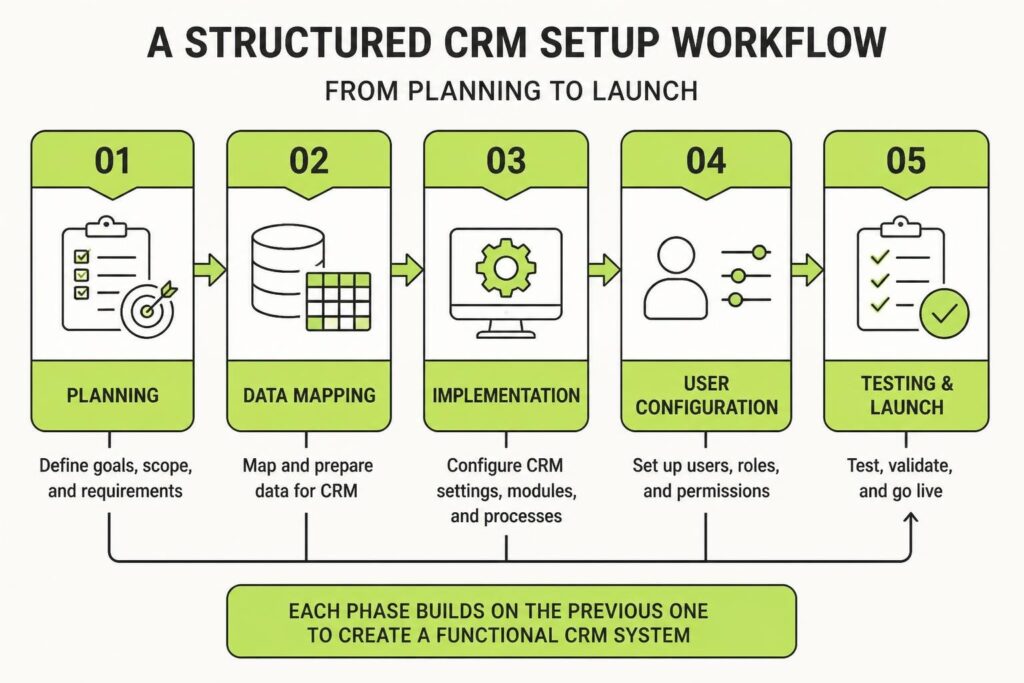
Setting up a CRM properly is the difference between a system that quietly captures every lead and one that becomes a digital filing cabinet nobody uses. Too many service businesses rush through implementation, skip critical steps, and end up with a half-built system that leaks opportunities. A solid crm setup checklist removes the guesswork. It helps you build infrastructure that actually protects revenue, streamlines client communication, and creates the kind of operational clarity that lets you scale without chaos.
This isn't about features or vendor comparisons. It's about the work that happens before, during, and after you flip the switch. Whether you're migrating from spreadsheets or replacing an old system, these steps apply.
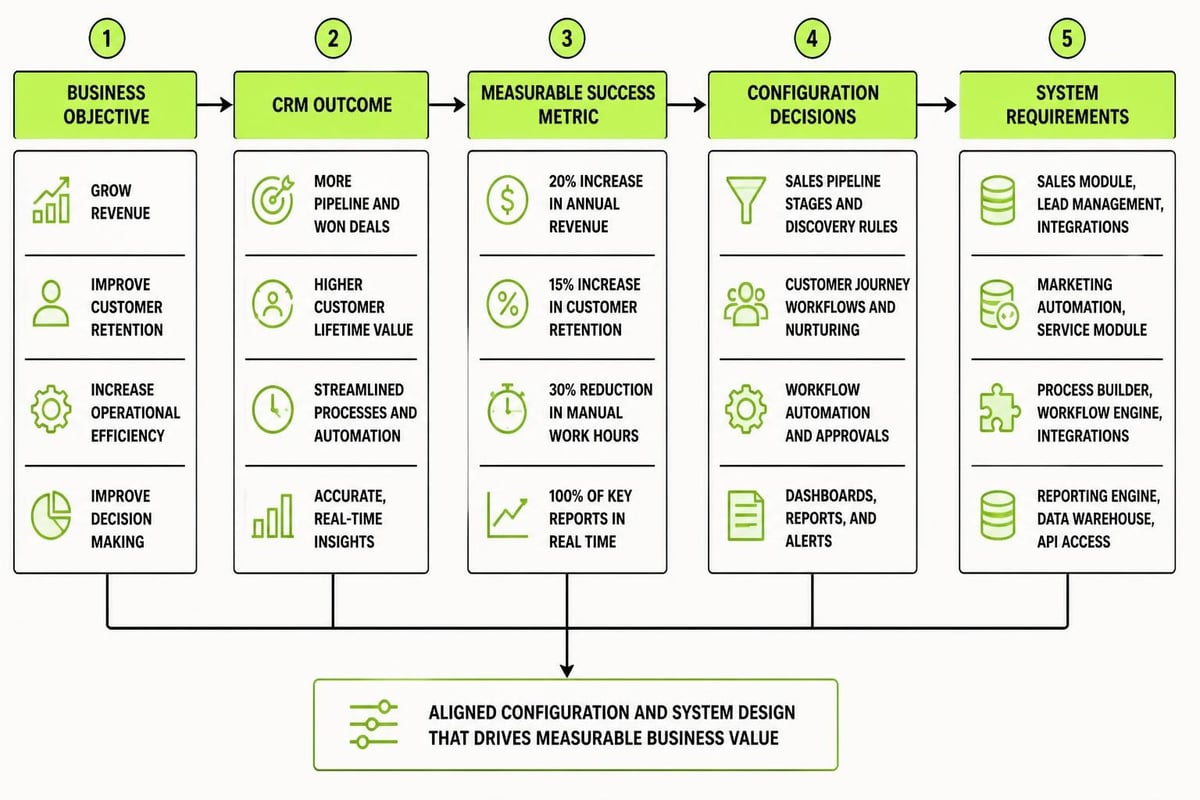
Define Your CRM Objectives and Success Metrics
Before you touch any software, write down what you need the CRM to do. Most businesses skip this step and configure their system around what's possible instead of what's necessary.
Start with clear outcomes:
- Reduce lead response time to under 10 minutes
- Track every client interaction in one place
- Automate follow-up sequences for new enquiries
- Generate weekly pipeline reports for the team
- Integrate with your existing marketing tools
Each objective should connect to a measurable result. "Better client management" is vague. "Reduce missed follow-ups by 80% within 60 days" is a target you can track.
Write down your current pain points too. Where do leads fall through the cracks? Which manual tasks eat up the most time? What data do you need but can't easily access? Your crm setup checklist should solve real problems, not theoretical ones.
Identify Your Key Stakeholders
Who will actually use this system? Sales reps, admin staff, project managers, and marketing all interact with client data differently.
Interview each group. Ask them what information they need, what slows them down, and what they wish they could automate. This feedback shapes your entire configuration. A CRM built by one person for everyone rarely works.
Also decide who owns the system. Someone needs to be the internal champion, responsible for updates, training, and troubleshooting. Without clear ownership, CRM systems decay fast.
Map Your Data Structure and Custom Fields
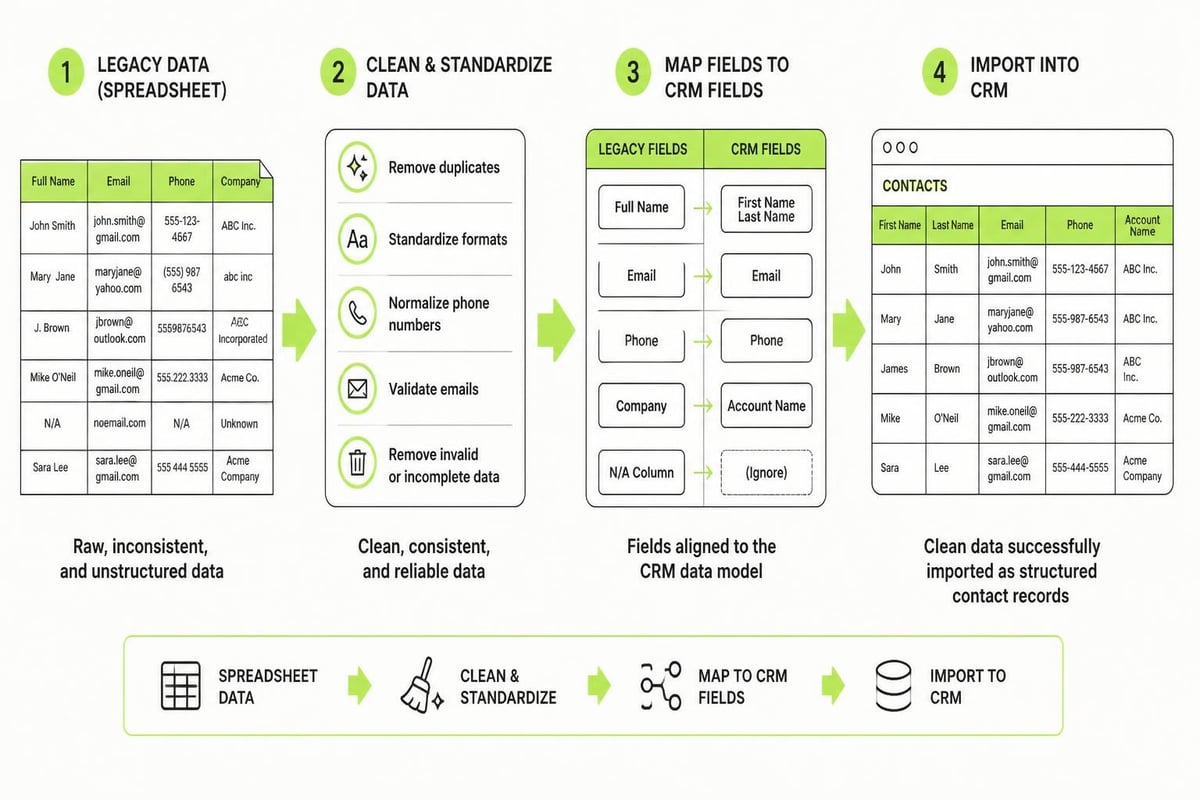
Your CRM setup checklist needs a detailed data plan. Most platforms come with default fields (name, email, phone), but service businesses need more. Custom fields let you capture the information that actually matters to your workflow.
| Data Category | Example Custom Fields | Purpose |
|---|---|---|
| Lead Source | Referral partner, Google Ads campaign, Website form | Track marketing ROI and attribution |
| Service Type | Plumbing repair, installation, maintenance contract | Route leads to the right team member |
| Project Stage | Quote sent, deposit paid, work scheduled, completed | Manage pipeline visibility |
| Lifetime Value | Total revenue, contract value, average job size | Prioritize high-value relationships |
Map out every piece of information you currently track in spreadsheets, notebooks, or email. Then decide what belongs in the CRM and what doesn't. Not everything needs to be captured. Focus on data that drives decisions or automates actions.
Create consistent naming conventions:
- Use clear, specific field names (avoid abbreviations)
- Standardize dropdown options (don't let users add random values)
- Document what each custom field means and when to use it
- Plan for future needs without over-engineering now
Clean data architecture now prevents messy cleanup later. Poor data structure is one of the top reasons CRM projects fail, according to research from Deloitte on CRM transformations.
Plan Your Contact Segmentation
How will you organize contacts? By service type, location, deal size, engagement level? Your segmentation strategy determines which automation you can build and what reports you can run.
Most service businesses benefit from segmenting by:
- Lead status (new enquiry, qualified, quoted, lost, customer)
- Service category (emergency work, scheduled maintenance, large projects)
- Engagement level (active, dormant, archived)
- Revenue tier (small jobs, medium contracts, enterprise clients)
These segments feed into automated workflows, email campaigns, and sales priorities. Plan them before you start importing data.
Configure User Roles and Permissions
Not everyone needs access to everything. A proper crm setup checklist includes clear permission levels that protect sensitive data and prevent accidental changes.
Common role structures for service businesses:
- Admin: Full system access, configuration, reporting, data export
- Sales/Account Manager: Create and edit contacts, manage deals, run personal reports
- Field Staff: View job details and client contact info, update job status
- Marketing: Access contact lists, create campaigns, view engagement metrics
- Read-Only: View dashboards and reports without editing capabilities
Think about what each person needs to do their job, then restrict everything else. This isn't about distrust. It's about reducing errors and maintaining data integrity.
Document these permissions in your crm setup checklist. New team members should slot into predefined roles, not get custom access every time. Consistency matters.
When evaluating vendor security practices, the IAPP vendor privacy and security assessment checklist provides a practical framework for due diligence.
Import and Clean Your Existing Data
Data migration is where most CRM setups go sideways. You're moving years of messy information from spreadsheets, old databases, and email into a clean system. Rush this step and you've just transferred chaos from one place to another.
Prepare Your Data for Import
- Export everything from your current systems into CSV files
- Deduplicate contacts using email addresses as the unique identifier
- Standardize formatting (phone numbers, addresses, date formats)
- Remove incomplete records that serve no purpose
- Map old field names to your new CRM structure
Run a small test import first. Bring in 50-100 records and check how they look. Fix any formatting issues before importing thousands of contacts.
Most CRM platforms provide import templates. Use them. They ensure your data lands in the right fields without manual cleanup afterward.
Common data cleanup tasks:
- Remove duplicate entries
- Standardize company names (Pty Ltd vs PTY LTD vs Pty. Ltd.)
- Fill in missing information where possible
- Archive old contacts you'll never contact again
- Tag imported data with the source for tracking
Consider professional help for large migrations. A few hours of expert work often saves weeks of fixing import errors. At MDO Digital, we build marketing systems that include proper CRM infrastructure from day one, avoiding the common pitfalls that derail DIY implementations.

Build Your Core Automation Workflows
This is where your CRM starts working for you instead of just storing information. Automation turns manual tasks into background processes that run 24/7.
Essential workflows for every service business:
- New lead notification → Alert the right team member within 60 seconds of enquiry
- Follow-up sequences → Automatically send emails if no response within 24/48/72 hours
- Quote reminder → Trigger follow-up when quoted work hasn't been scheduled
- Post-job review request → Send review link 2-3 days after job completion
- Dormant client reactivation → Re-engage customers who haven't booked in 6+ months
Each workflow should have clear triggers, actions, and exit conditions. Map these out in plain language before building them in the software.
| Workflow Name | Trigger | Actions | Exit Condition |
|---|---|---|---|
| New Lead Response | Form submission | Assign to sales rep, send auto-reply, create task | Rep makes contact |
| Quote Follow-Up | Quote status = sent for 3 days | Send reminder email, create follow-up task | Quote accepted or rejected |
| Review Request | Job status = completed | Wait 2 days, send review link via SMS and email | Review received or 14 days pass |
Start simple. Three well-built workflows beat ten half-finished ones. You can always add more automation later.
Test every workflow thoroughly before going live. Send yourself through each sequence and check that emails send, tasks get created, and data updates correctly.
Set Up Reporting and Dashboard Views
A CRM setup checklist must include reporting structure. If you can't easily see what's happening in your business, the system isn't finished.
Core reports every service business needs:
- Pipeline value by stage (how much revenue is in quotes vs scheduled work)
- Lead source performance (which marketing channels generate the most enquiries)
- Sales activity by rep (calls made, quotes sent, deals closed)
- Average response time to new leads
- Conversion rates at each pipeline stage
- Customer lifetime value and repeat booking rates
Build these reports during setup, not six months later when you finally ask "how are we tracking?"
Create Role-Specific Dashboards
Your field technician doesn't need the same view as your sales manager. Configure dashboards that surface relevant information for each role.
Dashboard examples:
- Sales Manager: Pipeline value, team activity, conversion rates, monthly targets
- Admin/Scheduler: Today's jobs, pending quotes, follow-up tasks
- Marketing: Lead sources, campaign performance, cost per lead
- Owner: Revenue trends, profit margins, growth metrics
Good dashboards answer questions at a glance. If someone has to dig through menus to find basic information, the dashboard isn't working.
Configure Integration Points
Your CRM doesn't exist in isolation. It needs to connect with your other business tools to create a complete system.
Common integrations for service businesses:
- Email platform (Gmail, Outlook) for contact sync and email tracking
- Calendar system for appointment scheduling
- Accounting software for invoice and payment data
- Marketing automation for campaigns and nurture sequences
- Phone system for call logging and click-to-call
- Job management software for work orders and scheduling
Not every integration needs to be live on day one. Prioritize the connections that eliminate double entry or unlock important automation.
Many modern platforms like those discussed in Forrester’s CRM modernization guidance emphasize integrated ecosystems over best-of-breed point solutions. Choose integrations that reduce complexity, not add to it.
Document each integration in your crm setup checklist: what data flows where, how often it syncs, and what to do if sync breaks. This documentation becomes critical when troubleshooting issues later.
Ensure Data Security and Compliance
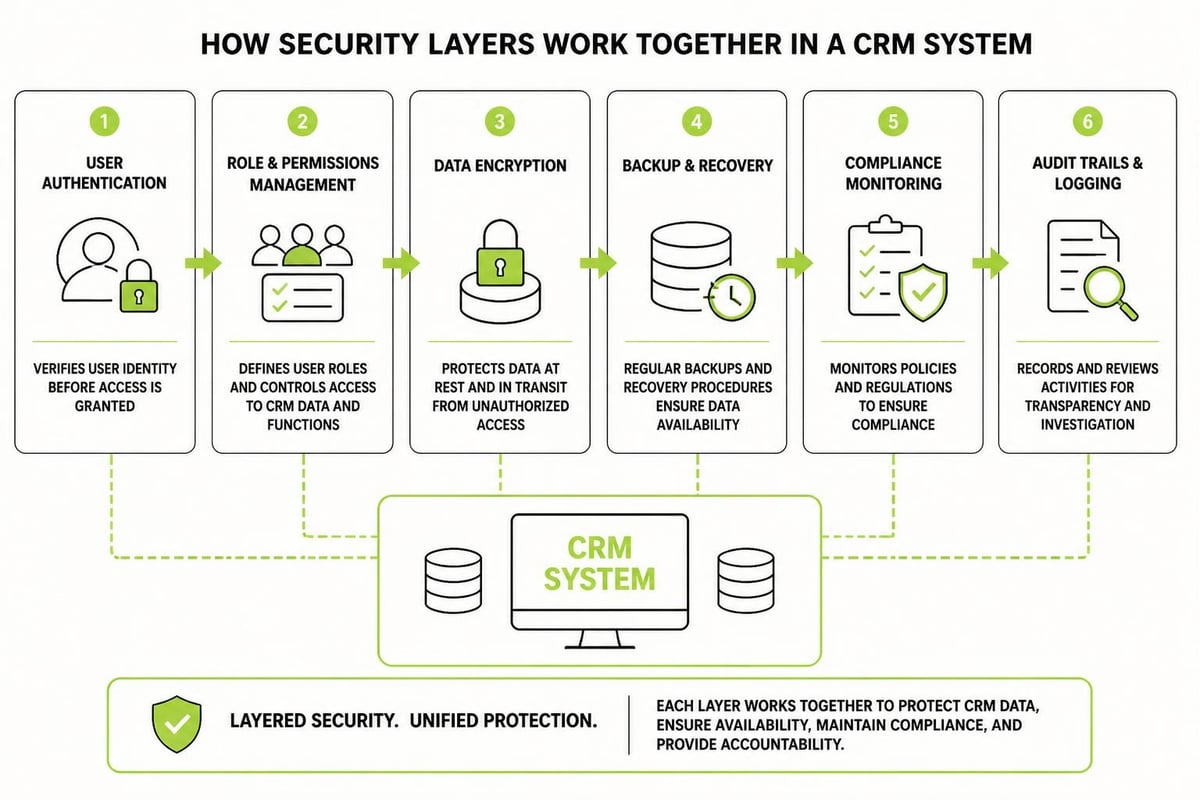
CRM systems hold sensitive client information. Your setup must include proper security configuration and privacy controls.
Security checklist items:
- Enable two-factor authentication for all users
- Set password complexity requirements
- Configure IP restrictions if accessing remotely
- Encrypt data at rest and in transit
- Set up regular automated backups
- Define data retention and deletion policies
- Document breach notification procedures
Review your CRM vendor's security certifications and compliance standards. For guidance on secure cloud CRM deployment, NIST publications provide practical frameworks for risk assessment and data protection.
Also consider Australian privacy obligations. Know where your client data is stored, who can access it, and how long you keep it. These aren't just technical questions, they're legal requirements.
Train Your Team Thoroughly
Software doesn't fail. Adoption fails. The best-configured CRM in the world is useless if your team won't use it.
Training should cover:
- Why this CRM matters (connect it to their daily pain points)
- How to complete their most common tasks
- What happens if they don't enter data (show real consequences)
- Where to get help when stuck
- How their work connects to business outcomes
Avoid the temptation to cover every feature. Focus on the 20% of functionality they'll use 80% of the time. Advanced features can wait.
Create simple job aids: one-page guides for common tasks. Screenshots with numbered steps beat complex written instructions every time.
Schedule hands-on practice sessions. Let people work through real scenarios in a training environment before going live. Muscle memory beats theoretical knowledge.
Training schedule example:
- Week 1: Overview session (30 minutes) covering why, what, and when
- Week 2: Role-specific workshops (60 minutes) for hands-on practice
- Week 3: Go-live with daily check-ins for troubleshooting
- Week 4: Refinement session addressing common questions
- Ongoing: Monthly tips highlighting underused features
Plan for ongoing training too. When you hire someone new, they should step into a structured onboarding process, not cobble together knowledge from different team members.
Test Everything Before Launch
Your crm setup checklist needs a formal testing phase. Go through every workflow, report, and integration as if you're a new user encountering the system for the first time.
Testing checklist:
- Submit test leads through all entry points (web forms, phone, email)
- Verify automation triggers fire correctly and on time
- Check that notifications reach the right people
- Confirm reports show accurate data
- Test integrations in both directions (data in and data out)
- Verify mobile access works for field staff
- Review permission levels for each role
- Run backup and restore procedures
- Check email deliverability for automated messages
Find someone outside the setup team to test the system. They'll spot confusing elements you've become blind to through familiarity.
Document every issue you find and categorize by severity. Fix critical problems before launch. Log minor issues for the improvement backlog.
Launch with a Pilot Group
Don't flip the switch for everyone at once. Start with a small pilot group, typically your most tech-comfortable users or a single team.
This controlled rollout lets you:
- Identify workflow gaps in a real environment
- Refine training based on actual questions
- Build internal champions who help others
- Catch configuration issues before they affect everyone
- Demonstrate success before broader deployment
Run the pilot for at least two weeks. Long enough to encounter edge cases and unusual scenarios, but short enough to maintain momentum.
Gather feedback systematically. Create a simple form or Slack channel where pilot users report issues and suggestions. Review this feedback daily and make quick adjustments.
Once the pilot group is running smoothly, expand in stages. Add one team or department at a time rather than going company-wide overnight.
Document Processes and Create a Knowledge Base
Your crm setup checklist should produce documentation as you go, not afterward. By launch, you should have:
- System architecture overview (what connects to what)
- User role definitions and permissions
- Custom field reference guide
- Workflow documentation for each automation
- Report and dashboard inventory
- Integration configuration details
- Troubleshooting guide for common issues
- Contact information for vendor support
Store this documentation where everyone can access it. A shared drive, internal wiki, or the CRM itself all work. Just make sure it's searchable and kept current.
Update documentation when you make changes. Outdated guides are worse than no guides because they breed confusion and mistrust.
Consider creating video tutorials for visual learners. A two-minute screen recording often explains better than a page of written instructions.
Monitor Adoption and Iterate
Setup doesn't end at launch. The first 90 days determine whether your CRM becomes essential infrastructure or abandoned software.
Key metrics to track:
- Daily active users as percentage of total team
- Data entry completeness (how many records have all required fields)
- Automation usage (are workflows running as expected)
- Report views (which dashboards get used, which get ignored)
- Support requests by category
These numbers tell you where the system works and where it doesn't. Low adoption in a specific team? Their workflow might need adjustment. Certain fields always left blank? Maybe they're not relevant or not clearly explained.
Schedule weekly review sessions for the first month, then move to monthly check-ins. Look at the data together and ask what needs to change.
Celebrate wins. When someone closes a deal because the CRM triggered a timely follow-up, share that story. When automation saves hours of manual work, quantify and communicate it.
Building a structured digital marketing system requires the same methodical approach whether you're setting up a CRM, building automation, or creating a complete marketing plan.
Establish Ongoing Maintenance Protocols
Your crm setup checklist should include long-term maintenance plans. Systems drift without regular attention.
Monthly maintenance tasks:
- Review and archive old records
- Check automation error logs
- Update integration connections if APIs change
- Review user access and remove inactive accounts
- Check backup integrity
- Update documentation for any configuration changes
Quarterly reviews:
- Analyze report usage and retire unused dashboards
- Survey users about pain points
- Review custom fields and remove unused ones
- Assess integration performance
- Plan new automation based on evolving needs
Assign these tasks to specific people with calendar reminders. Maintenance that's everyone's job becomes no one's job.
Also stay current with platform updates. Most CRM vendors release new features monthly. Review release notes and assess which capabilities might improve your workflows. The system you set up today should evolve as your business grows.
A thorough crm setup checklist transforms software into business infrastructure that protects leads, streamlines operations, and drives predictable growth. The difference between a system that works and one that sits unused comes down to disciplined implementation. If you need help building CRM infrastructure that actually fits how service businesses operate, MDO Digital specializes in creating marketing systems that remove chaos and compound results over time.