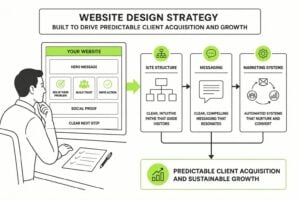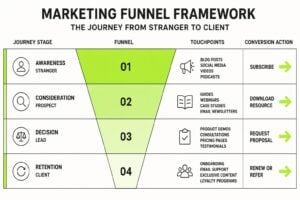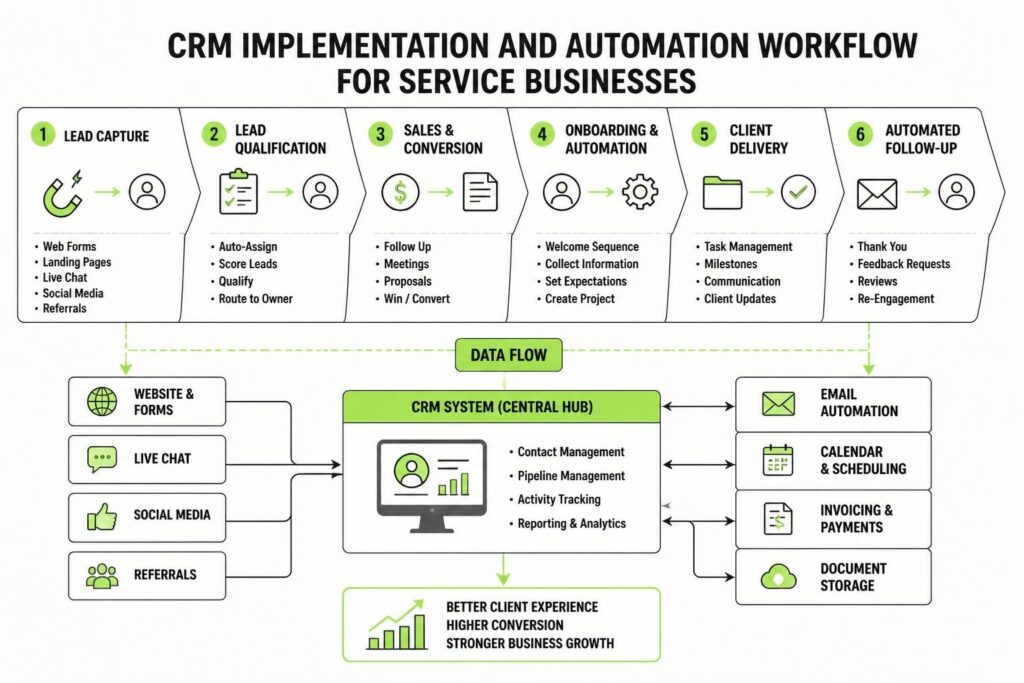
Service businesses run on relationships, but relationships don't scale without systems. You can only track so many conversations in your head, only remember so many follow-up dates, only manage so many client touchpoints manually before something falls through. That's where crm implementation and automation for service businesses becomes essential. Not as a nice-to-have, but as infrastructure that protects revenue and creates capacity for growth. Done right, a CRM turns chaotic client management into a predictable engine that captures every lead, nurtures every opportunity, and delivers consistent experiences without requiring you to remember everything.
Why Service Businesses Need Proper CRM Implementation
Most service businesses start with spreadsheets, scattered notes, and good intentions. That works until it doesn't. The breaking point usually arrives quietly: a hot lead goes cold because nobody followed up, a client inquiry gets lost in email, or you realise you can't remember who you quoted three weeks ago.
The cost isn't always obvious. Lost opportunities don't announce themselves. They just disappear into the gap between busy and organised.
A properly implemented CRM solves three fundamental problems:
- Lead leakage: Every inquiry gets captured, tagged, and assigned automatically
- Follow-up failure: Automated sequences ensure nobody falls through the cracks
- Visibility gaps: You can see your entire pipeline at a glance, not scattered across tools
Service businesses have specific needs that product-based businesses don't share. You're selling time, expertise, and outcomes. Your sales cycle involves conversations, proposals, revisions, and relationship building. Generic CRM setups miss this context entirely.
The Real ROI of CRM Implementation
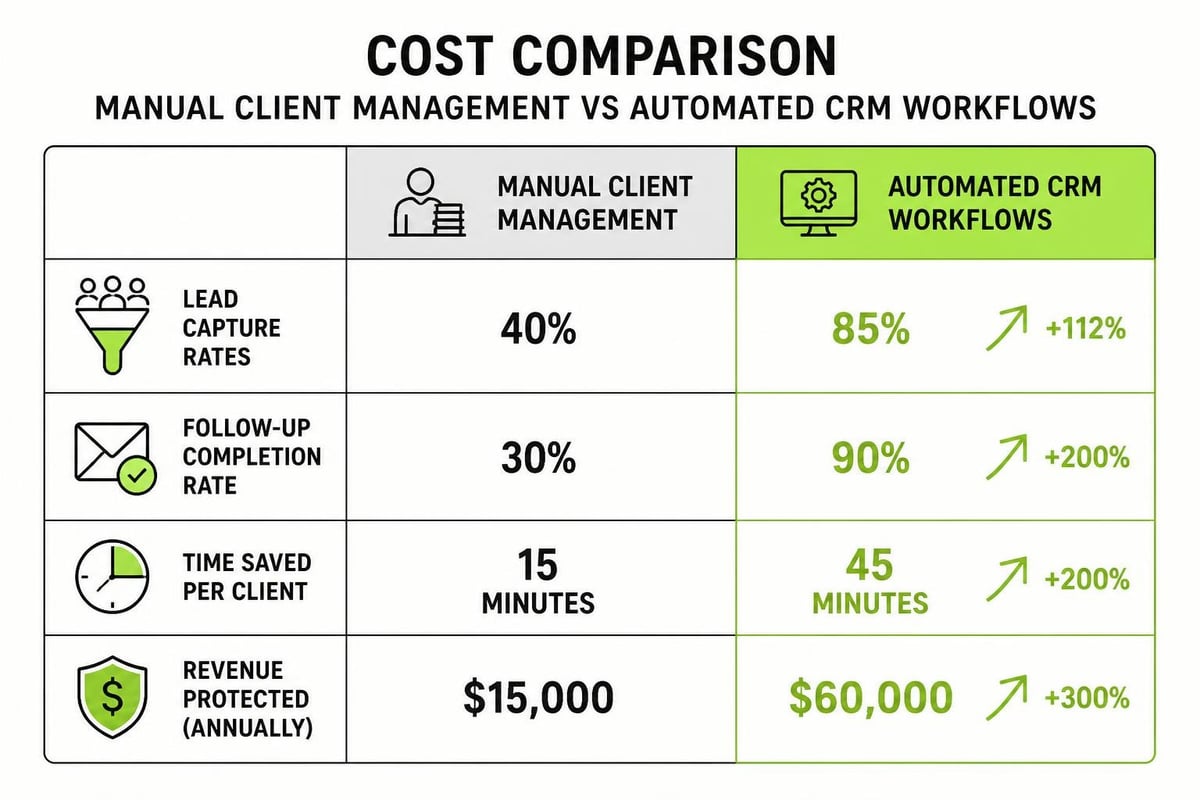
Return on investment for crm implementation and automation for service businesses isn't about fancy features. It's about recovered revenue and created capacity.
When you automate lead capture, you stop losing inquiries that arrive outside business hours or through multiple channels. When you automate follow-up, you convert more prospects without adding team members. When you automate client onboarding, you deliver consistent experiences while freeing up hours every week.
| Problem Area | Manual Cost | Automated Solution |
|---|---|---|
| Lead capture | 30% inquiry loss from missed contacts | 100% capture rate with web forms, email parsing |
| Follow-up timing | 50% of leads never contacted twice | Automated sequences based on behavior and time |
| Proposal tracking | No visibility on pending quotes | Dashboard showing all proposals, status, next actions |
| Client onboarding | 3-5 hours per client manually | 20 minutes with automated workflows and templates |
Those numbers compound. If you're bringing in 40 leads monthly and losing 30% to poor capture and follow-up, that's 12 opportunities gone every month. At a 20% close rate and $5,000 average project value, you're leaving $144,000 on the table annually.
Choosing the Right CRM for Service Business Workflows
Not all CRMs are built for service delivery. Some focus on transactional sales, others on e-commerce, still others on enterprise complexity. Service businesses need platforms that understand project-based work, conversation-heavy sales cycles, and ongoing client relationships.
Platform Considerations
HoneyBook works well for small service businesses needing an all-in-one solution. The HoneyBook CRM review highlights its strength in combining client communication, contracts, invoicing, and scheduling in one place. It's particularly suited to creative services and consultants who want simplicity over customisation.
Creatio takes a different approach. The Creatio CRM platform offers no-code customisation, letting you build workflows specific to your service delivery model without hiring developers. This flexibility matters when your process doesn't fit standard templates.
For budget-conscious teams, Apptivo CRM provides modular functionality at lower price points. You pay for what you need and add modules as you scale. The trade-off is typically more setup time and less polish.
Key criteria for service businesses:
- Pipeline customisation: Can you map stages to your actual sales process?
- Activity tracking: Does it capture calls, emails, meetings without manual entry?
- Proposal and quote management: Can you track estimates and follow up automatically?
- Integration capability: Does it connect to your calendar, email, project management, and accounting tools?
- Reporting clarity: Can you see conversion rates, pipeline velocity, and revenue forecasts easily?
Don't choose based on features lists. Choose based on how well the platform mirrors your actual workflow. The best CRM is the one your team will actually use consistently.
Implementation Strategy That Actually Works
CRM implementation fails more often than it succeeds. Not because of bad software, but because of bad process. Teams try to migrate everything at once, over-customise before understanding basics, or skip the unglamorous work of cleaning data and defining standards.
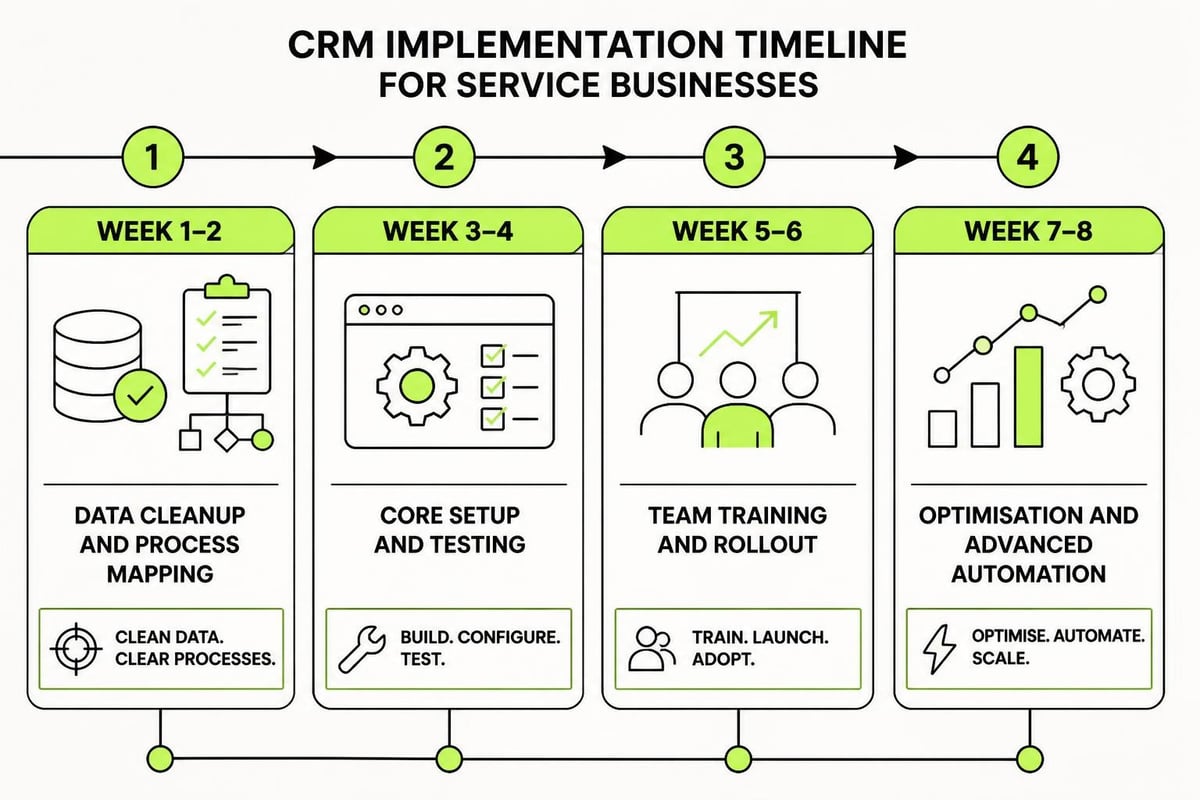
Phase 1: Foundation and Data Cleanup
Start by documenting your current process. How do leads arrive? Who handles them? What happens next? Map every step, even the informal ones. This reveals what actually needs automating.
Then clean your data before migration. Spreadsheets full of duplicates, outdated contacts, and inconsistent formatting will pollute your new system. Better to import 500 clean contacts than 2,000 messy ones.
Define your data standards:
- Required fields for every contact (name, email, phone, source)
- How you'll tag and categorise contacts (by service, industry, status)
- Naming conventions for companies and deal stages
- Lead sources and how they're tracked
Phase 2: Core Setup and Testing
Configure your pipeline stages to match reality. If your sales process goes: Initial Inquiry → Discovery Call → Proposal Sent → Revisions → Won/Lost, that's your pipeline. Don't add stages you think you should have. Build what you actually do.
Set up basic automation first:
- New lead notifications to the right team member
- Automatic task creation when deals move stages
- Follow-up reminders based on last contact date
- Email templates for common responses
Test everything with real data before going live. Create dummy contacts, run them through your pipeline, trigger automations. Find the breaks in controlled conditions, not when a real opportunity is on the line.
Building Automation That Compounds Results
Automation isn't about replacing human judgment. It's about removing repetitive work so humans can focus on judgment, creativity, and relationship building. The best automation in crm implementation and automation for service businesses runs invisibly, creating consistency without creating rigidity.
Lead Nurture Sequences
Every service business has leads that aren't ready to buy now. Without automation, these contacts get forgotten. With automation, they get valuable touchpoints until timing aligns.
A basic nurture sequence might look like:
- Day 0: Welcome email confirming receipt of inquiry
- Day 2: Educational content relevant to their stated need
- Day 7: Case study showing similar project outcomes
- Day 14: Check-in email asking if they have questions
- Day 30: Final touchpoint offering to jump on a brief call
This runs automatically based on triggers. Someone fills a contact form? Sequence starts. They book a call before day 7? Sequence stops. They don't respond by day 30? They move to a long-term nurture list with monthly content.
Proposal and Follow-Up Automation
Proposals sent into the void rarely close. Strategic follow-up matters, but remembering to follow up at the right intervals is unreliable when you're busy.
| Follow-Up Stage | Timing | Automated Action |
|---|---|---|
| Proposal sent | Immediately | Confirmation email with proposal link, FAQ document |
| First check-in | 3 days | "Have you had a chance to review?" with offer to discuss questions |
| Value reinforcement | 7 days | Case study or testimonial relevant to their project type |
| Decision prompt | 14 days | "Where are you at in your decision process?" direct question |
| Final outreach | 21 days | "Should I close this file or is there still interest?" |
Each touchpoint is personalised but triggered automatically. You're not manually tracking 15 open proposals. The system reminds you, or better yet, handles routine follow-up while flagging which deals need personal attention.
If you're building out your entire client acquisition system, the 7-Step Marketing Plan framework helps you connect CRM infrastructure to the broader marketing engine. It walks through how lead generation, nurture campaigns, and CRM automation work together to create predictable demand.
Integrating CRM With Your Service Delivery Stack
A CRM doesn't exist in isolation. It needs to talk to your calendar, your project management system, your accounting software, and your communication tools. Integration is what transforms isolated automation into a coherent system.
Essential Integrations for Service Businesses
Email integration is non-negotiable. Your CRM should capture every email conversation with contacts automatically. No manual logging, no copying and pasting. Tools like Gmail and Outlook integrate natively with most platforms. If you're using something custom, APIs exist for a reason.
Calendar sync ensures meetings booked through your CRM appear in your calendar, and vice versa. When a prospect books a discovery call, it should create a CRM activity, block your calendar, and trigger a confirmation sequence without you touching anything.
Project management connection closes the loop between sales and delivery. When a deal moves to "won," it should automatically create a project in your delivery system (Asana, ClickUp, Notion, whatever you use) with the right template and team assignments.
Accounting integration keeps financial data aligned. When you send an invoice, it updates the CRM deal value. When payment arrives, it marks the project complete. No double entry, no reconciliation headaches.
Some platforms offer native integrations. Others require middleware like Zapier or Make. Neither approach is inherently better, but understanding the difference between digital marketing systems and how they connect helps you make informed choices.
Data Flow Architecture
Think about how information moves through your business:
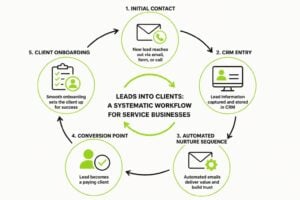
- Lead arrives via web form, email, or referral
- CRM captures contact, assigns to team member, starts nurture
- Team member qualifies lead, books discovery call
- Discovery call notes logged, proposal generated
- Proposal accepted, deal marked won
- Project created in delivery system, team notified
- Invoice sent, payment tracked
- Project completed, feedback requested, contact moved to past client nurture
Each transition point is an opportunity for automation. The question isn't whether to automate everything (you shouldn't). It's where automation creates reliability and where human touch creates value.
Training Your Team for Consistent Adoption
The best CRM implementation fails if your team doesn't use it consistently. Adoption isn't about forcing compliance. It's about making the system genuinely easier than the old way.
Making CRM the Path of Least Resistance
People resist new tools when those tools create more work. If logging a call takes five clicks and three required fields, they'll skip it. If updating a deal status requires navigating multiple menus, they'll put it off.
Design your CRM for lazy compliance:
- Minimize required fields to only what you'll actually use
- Use defaults and smart values wherever possible
- Create templates for repetitive tasks
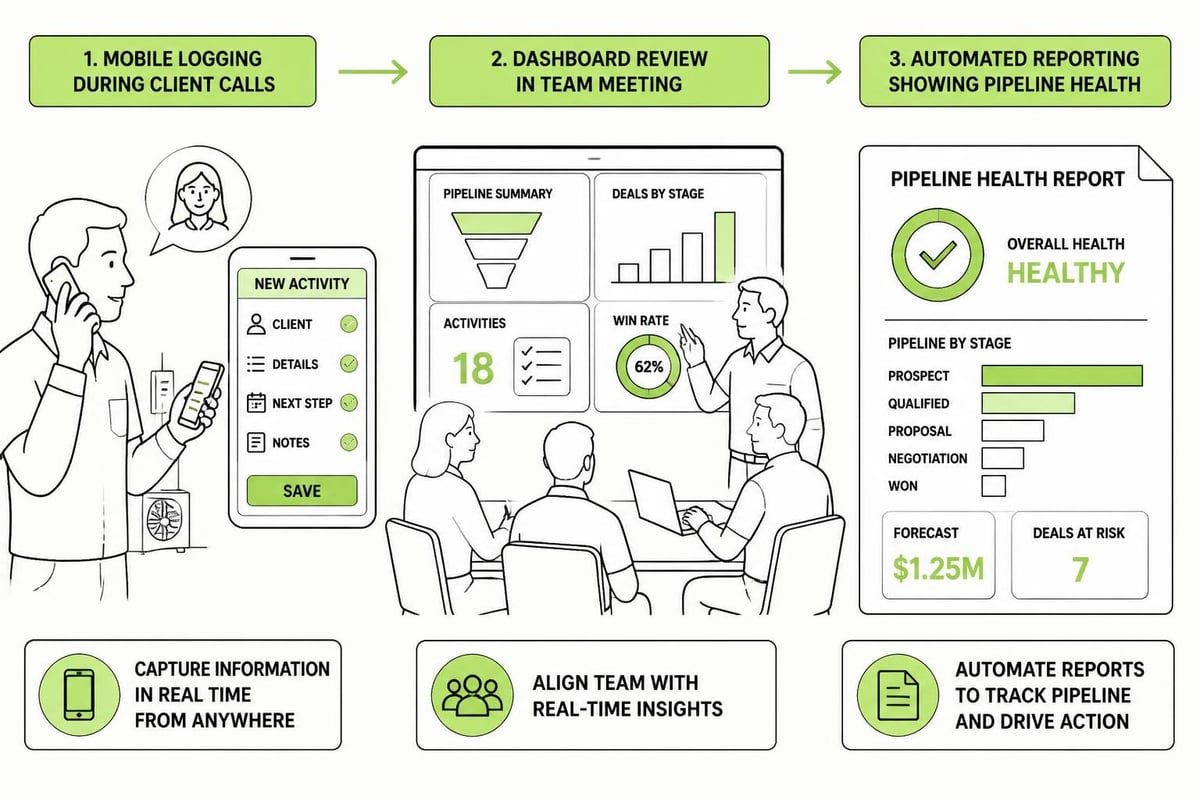
- Set up mobile access so logging happens in the moment, not later
- Build dashboards that show each person only what they need to see
Train in small chunks, not marathon sessions. One hour covering everything equals information overload and nothing retained. Fifteen minutes on lead capture, practice, then move on. Next week, fifteen minutes on moving deals through stages.
Creating Accountability Without Micromanagement
You need standards, but you don't need to police them constantly. Set clear expectations about what gets logged (all client conversations, all proposals, all meetings) and what doesn't (internal team chats, casual touchpoints).
Build reporting that shows activity levels without being intrusive. A weekly team view showing deals moved, calls logged, and proposals sent creates healthy visibility. Everyone can see how they're contributing.
Recognition matters more than enforcement. When someone closes a deal that came through automated nurture, call it out. When consistent CRM use reveals a pattern that improves your process, celebrate it. You're building culture around systems, not just implementing software.
Measuring What Matters in Your CRM
Data without decisions is just noise. Your CRM should answer specific questions about your business health, not just collect information.
Core Metrics for Service Businesses
Pipeline velocity tells you how long deals take to close. If your average sale takes 45 days from inquiry to signed contract, that's your baseline. Monitoring this over time reveals whether you're getting faster or slower at converting opportunities.
Conversion rates at each stage show where opportunities stall. If 80% of discovery calls lead to proposals but only 20% of proposals close, your proposal process needs work, not your call strategy. The business and marketing systems you build should address actual bottlenecks, not assumed ones.
Lead source performance separates what's working from what's costing you money. If referrals close at 40% but paid ads close at 8%, that difference should inform your marketing and business development priorities.
| Metric | What It Reveals | Action Threshold |
|---|---|---|
| Days in pipeline | Sales cycle efficiency | 20% increase signals process breakdown |
| Proposal-to-close rate | Proposal quality and follow-up effectiveness | Below 25% means qualification or pricing issues |
| Lead response time | How quickly team engages new opportunities | Over 24 hours correlates with 50% lower close rates |
| Automation completion rate | Whether sequences are running properly | Below 90% means technical problems or poor triggers |
Activity metrics (calls made, emails sent, meetings held) matter less than outcome metrics (deals closed, revenue generated, client retention). Track activity to diagnose problems, but measure success by results.
Advanced Automation for Scaling Service Delivery
Once your foundation is solid, advanced automation creates leverage. These aren't essential for everyone, but they unlock capacity as you grow.
AI-Powered Lead Scoring
Not all leads are equal. Some match your ideal client perfectly, others are tire kickers or poor fits. Manual qualification works when you have 20 leads monthly. At 200, you need systems.
Lead scoring assigns points based on criteria you define. Company size, industry, budget indicators, engagement level, and behavior all factor in. The CRMArena research explores how AI agents can handle realistic CRM tasks, including sophisticated lead qualification that improves over time.
High-score leads get immediate human attention. Mid-score leads enter targeted nurture. Low-score leads get educational content but don't consume sales time.
Behavior-Based Segmentation
People tell you what they're interested in through their actions. Someone who downloads a pricing guide is further along than someone who reads a general blog post. Someone who visits your case studies three times is signaling buying intent.
Modern CRMs track this activity and segment automatically:
- High intent: Visited pricing, downloaded case studies, clicked proposal link multiple times
- Research phase: Engaging with educational content, comparing options, not looking at pricing
- Awareness stage: Minimal engagement, early in buyer journey
Each segment gets different messaging. High-intent contacts get direct outreach. Research-phase contacts get comparison content. Awareness-stage contacts get thought leadership.
Client Success Automation
The sale isn't the end. Client retention and referrals drive service business profitability. Automation ensures consistent delivery and proactive relationship management.
Onboarding sequences that trigger when deals close create structured experiences. Day 1 welcome email, day 2 expectation-setting document, day 7 check-in call, day 14 first deliverable review. Every client gets the same excellent experience regardless of who's busy that week.
Milestone-based touchpoints keep relationships warm. After project completion, automated feedback requests and testimonial asks. At 90 days post-project, a check-in about results and future needs. At 180 days, a referral request with easy sharing tools.
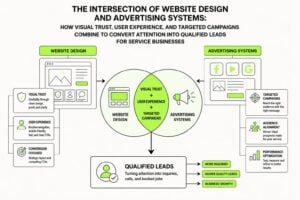
This kind of systematic client relationship management, paired with strong branding and advertising, creates compound growth. Happy clients become repeat clients and referral sources without you manually remembering to stay in touch.
Common Implementation Mistakes to Avoid
Knowing what not to do saves months of frustration.
Over-customisation before understanding basics is the most common error. Teams spend weeks building custom fields, complex workflows, and elaborate integrations before using the CRM for actual work. Start simple. Add complexity only when simplicity proves insufficient.
Migrating dirty data poisons your new system from day one. Take the time to clean, deduplicate, and standardise before import. It's unglamorous work that pays dividends forever.
Skipping documentation means only one person understands how things work. When they're unavailable, the system breaks. Document your processes, automations, and integrations. Make tribal knowledge explicit.
Treating implementation as a project with an end date rather than an ongoing system refinement process. Your CRM should evolve as your business evolves. Review quarterly, optimise continuously, add capabilities as needs become clear.
Choosing platforms based on features instead of fit. The Constant Contact Lead Gen & CRM review might highlight impressive marketing automation, but if your team finds it confusing and doesn't use it, those features are worthless.
Building for Scale, Not Just Survival
CRM implementation and automation for service businesses isn't about keeping up with competitors or checking a box. It's about building infrastructure that supports growth without proportionally increasing overhead.
When your client management runs on systems instead of memory, you create capacity. When your lead nurture runs automatically, you convert more opportunities without hiring more salespeople. When your onboarding delivers consistency, you protect your reputation at scale.
The businesses that grow predictably aren't working harder. They've built better systems. Systems that protect leads, automate routine work, and create structured growth that compounds over time.
For custom implementation that fits your specific service model, expert CRM implementation services offer dedicated project management and seamless integration. That level of support makes sense when you're ready to invest in getting it right the first time.
The difference between a CRM that gathers dust and one that transforms your business is implementation quality. Not the platform you choose, but how thoughtfully you deploy it, how thoroughly you train your team, and how consistently you optimise based on real data.
Integration With Broader Marketing Systems
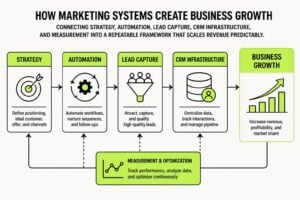
Your CRM sits at the center of your marketing infrastructure, but it's not the whole picture. Lead generation feeds it, marketing automation nurtures within it, analytics measure its effectiveness, and delivery systems execute what it captures.
Understanding how digital marketing and content marketing work together shows how CRM fits into the bigger ecosystem. Content attracts attention, CRM captures and qualifies it, automation nurtures it, and your delivery team converts it to revenue.
This integration matters because isolated systems create gaps. A brilliant ad campaign that sends leads to a broken capture form wastes money. A sophisticated nurture sequence targeting the wrong segment wastes time. A CRM full of opportunities that never get followed up wastes potential.
Your marketing tech stack should include:
- Content and SEO platforms driving organic traffic
- Paid advertising channels driving targeted traffic
- Landing pages and forms capturing visitor information
- CRM storing and managing contact relationships
- Email automation nurturing leads over time
- Analytics measuring what's working and what isn't
- Project management executing delivery after sales
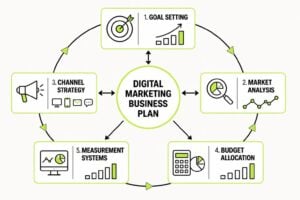
Each piece connects to the others through data flow and strategic alignment. Your marketing plan for digital marketing should map these connections explicitly, not leave them to chance.
The service businesses winning in 2026 aren't doing one thing exceptionally well. They're doing many things adequately and connecting them into coherent systems. CRM implementation and automation sits at that nexus, turning marketing effort into captured leads, captured leads into qualified opportunities, and qualified opportunities into delighted clients.
CRM implementation and automation for service businesses transforms how you capture opportunity, nurture relationships, and scale delivery. The difference between chaotic growth and structured growth isn't effort, it's systems. If you're ready to remove chaos, protect leads, and build marketing infrastructure that actually compounds, MDO Digital specialises in exactly this work. We implement CRM and automation systems designed specifically for service businesses that want predictable growth without proportional overhead.