Most service businesses lose more leads than they capture. Someone fills out a contact form, but it lands in a generic inbox. No one follows up for three days. The lead goes cold. Another inquiry comes through Facebook Messenger at 9pm on a Saturday. It gets buried under notifications. By Monday morning, that person has already called your competitor. This isn't a people problem. It's a systems problem. Without proper lead capture systems in place, you're not just losing opportunities. You're burning the money you spent getting attention in the first place.
What Lead Capture Systems Actually Do
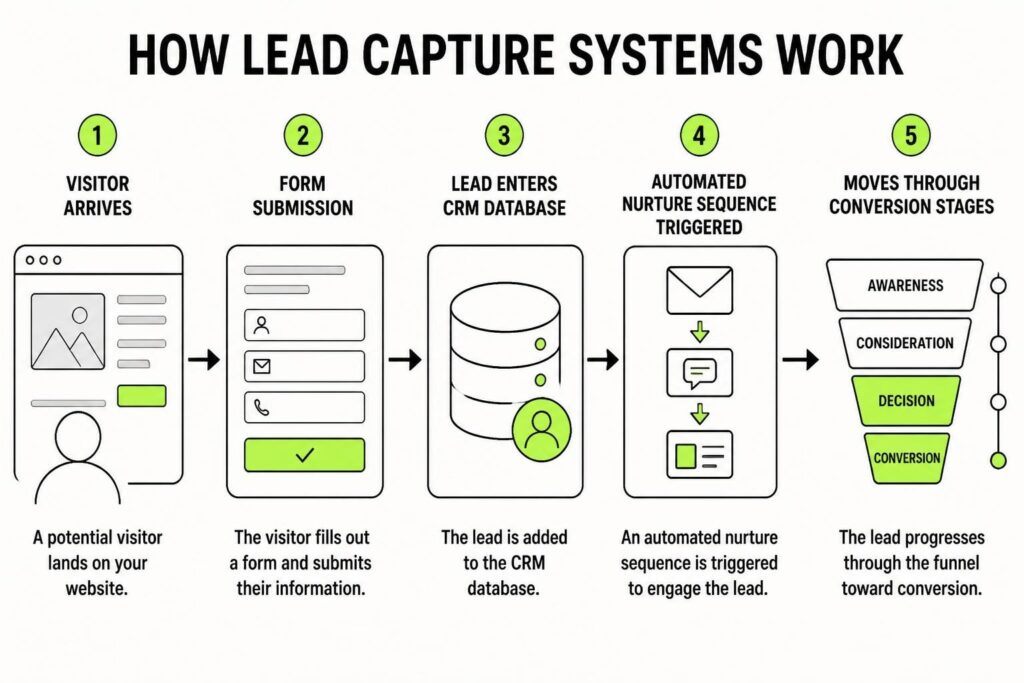
Lead capture systems do one job: turn anonymous visitors into identifiable contacts you can follow up with. That sounds simple, but most businesses treat it like an afterthought. They slap a contact form on their website and hope for the best. Real lead capture systems do more than collect names and email addresses. They qualify interest, route inquiries to the right person, trigger immediate follow-up, and feed data into your CRM where it can actually be used.
The difference between a form and a system is what happens after someone hits submit. A form just collects information. A system captures it, stores it, tags it, notifies the right people, and starts the nurture process automatically. That distinction matters when you're trying to build predictable revenue instead of chasing random inquiries.
The Core Components That Make It Work
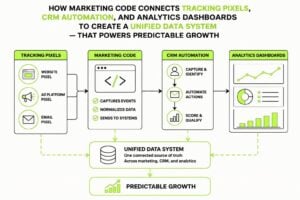
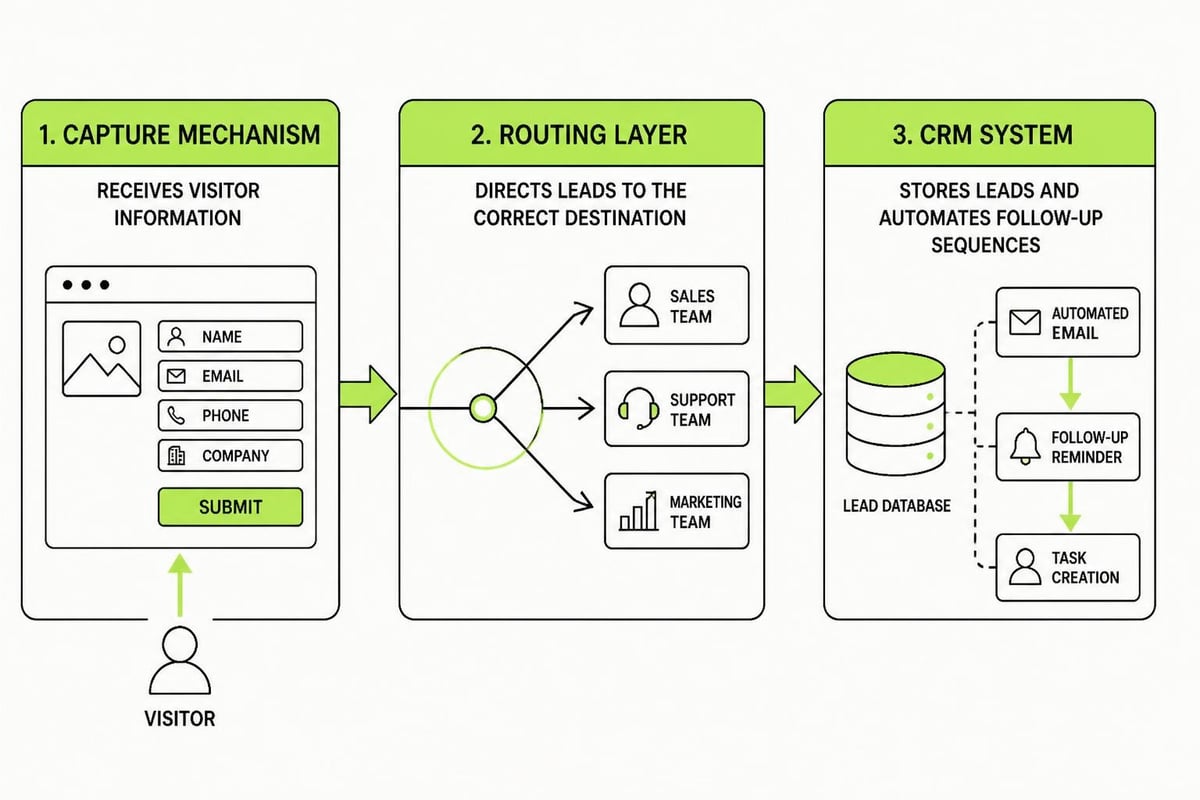
Every effective lead capture system has three layers working together. The capture mechanism is the front-end piece: forms, chat widgets, landing pages, or phone tracking. This is where the lead enters your world. The routing layer decides what happens next. Does this lead go to sales? To a nurture sequence? To a specific team member based on location or service type? The storage and automation layer is your CRM and the workflows connected to it. This is where leads live, get tagged, and move through your pipeline.
Most businesses nail the first layer and ignore the other two. They have forms everywhere but no idea where those leads go or what happens to them. That's not a system. That's just data collection with extra steps.
Why Most Lead Capture Fails
The biggest mistake is treating every lead the same. Someone downloading a free guide isn't ready for a sales call. Someone requesting a quote needs different handling than someone asking a general question. When your lead capture systems don't account for intent, you either overwhelm cold leads with aggressive follow-up or under-serve hot leads who are ready to buy.
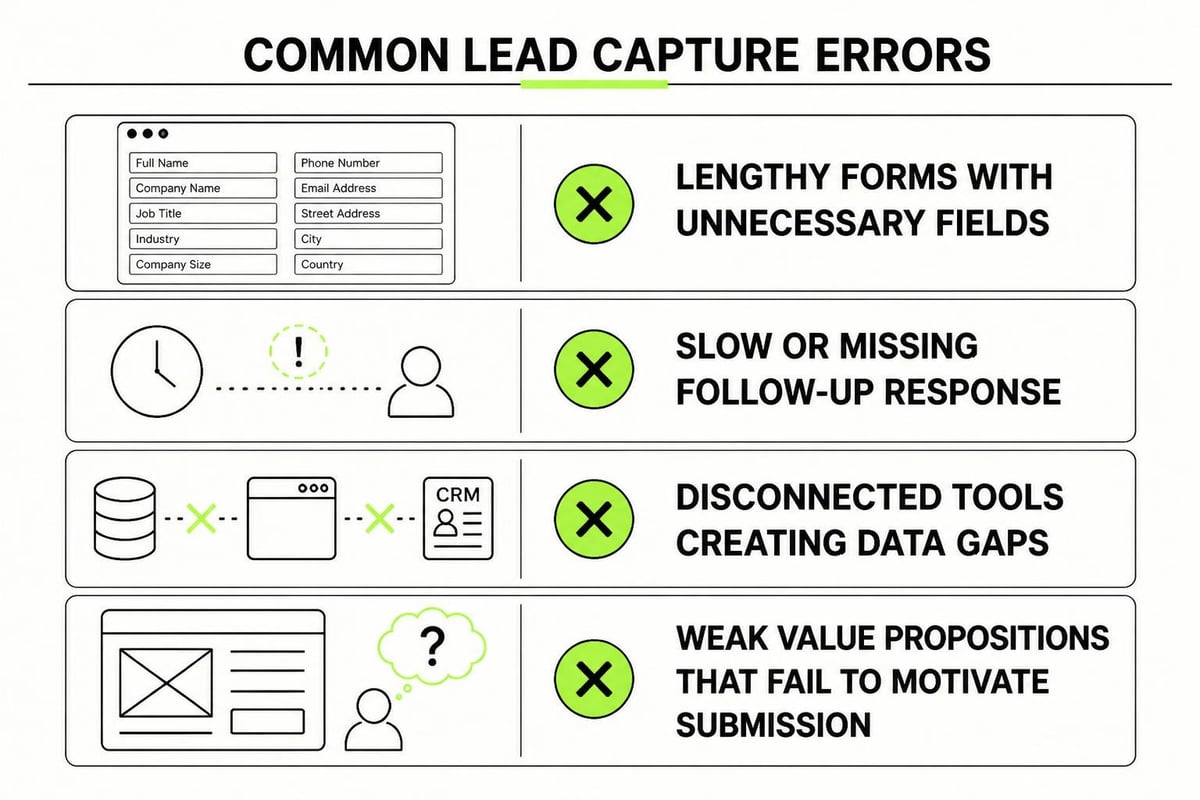
Another common failure point is friction. Long forms kill conversions. Asking for a phone number when someone just wants to download a checklist creates resistance. Best practices for lead capture forms show that every extra field drops your conversion rate. But most businesses don't test this. They ask for everything up front because "more data is better." It's not. Better data is better. Relevant data is better. Data you'll actually use is better.
Then there's the black hole problem. Leads come in, but no one knows where they go. They sit in an inbox. They get forwarded three times. Someone eventually replies, but by then the lead has moved on. According to research on lead capture optimization, the odds of qualifying a lead drop 21 times if you wait more than 30 minutes to respond. Most service businesses wait hours, sometimes days.
Building a System That Actually Captures Leads
Start with understanding where your leads come from. Website forms, phone calls, social media messages, live chat, referrals, events. Each source needs its own capture method, but they all need to feed into the same central system. If your CRM doesn't know about a lead from Instagram DMs because it only tracks website forms, you've got a gap that's costing you money.
Map Every Entry Point
Make a list of every way someone can contact your business. Include the obvious ones (contact form, phone number) and the hidden ones (Google Business Messages, LinkedIn InMail, email forwarded from a partner). Now map where each of those leads currently goes. If the answer is "someone's personal inbox" or "I'm not sure," you've found your first problem to fix.
Once you know the entry points, you can start standardizing how information gets captured. This doesn't mean forcing everyone through a website form. It means making sure that whether someone calls, emails, or messages you on Facebook, their information ends up in the same place with the same level of detail.
| Entry Point | Current Destination | Problems | Solution |
|---|---|---|---|
| Website form | Generic email | No tracking, slow response | Form to CRM with auto-response |
| Phone calls | Notes in notebook | Data lost, no follow-up | Call tracking to CRM entry |
| Social DMs | Platform inbox | Forgotten, no history | Unified inbox or manual CRM entry |
| Live chat | Chat tool only | Disconnected from sales pipeline | Chat integration with CRM |
Design Forms That Convert
Your forms should ask for the minimum information needed to start a conversation. Name and email are usually enough for top-of-funnel offers. For bottom-of-funnel conversions like booking a consultation, you can ask for more because the intent is higher. The key is matching friction to intent.
Use conditional logic to keep forms short while still collecting useful data. If someone selects "website design" as their interest, show a follow-up question about timeline. If they select "branding," ask about their current stage. This keeps the initial form simple while gathering specifics from people willing to provide them.
Lead capture form design principles emphasize clarity over cleverness. Label fields clearly. Explain why you need information if it's not obvious. Use inline validation so people know immediately if they've made an error. Little details like these reduce abandonment and improve data quality.
Connecting Capture to Follow-Up
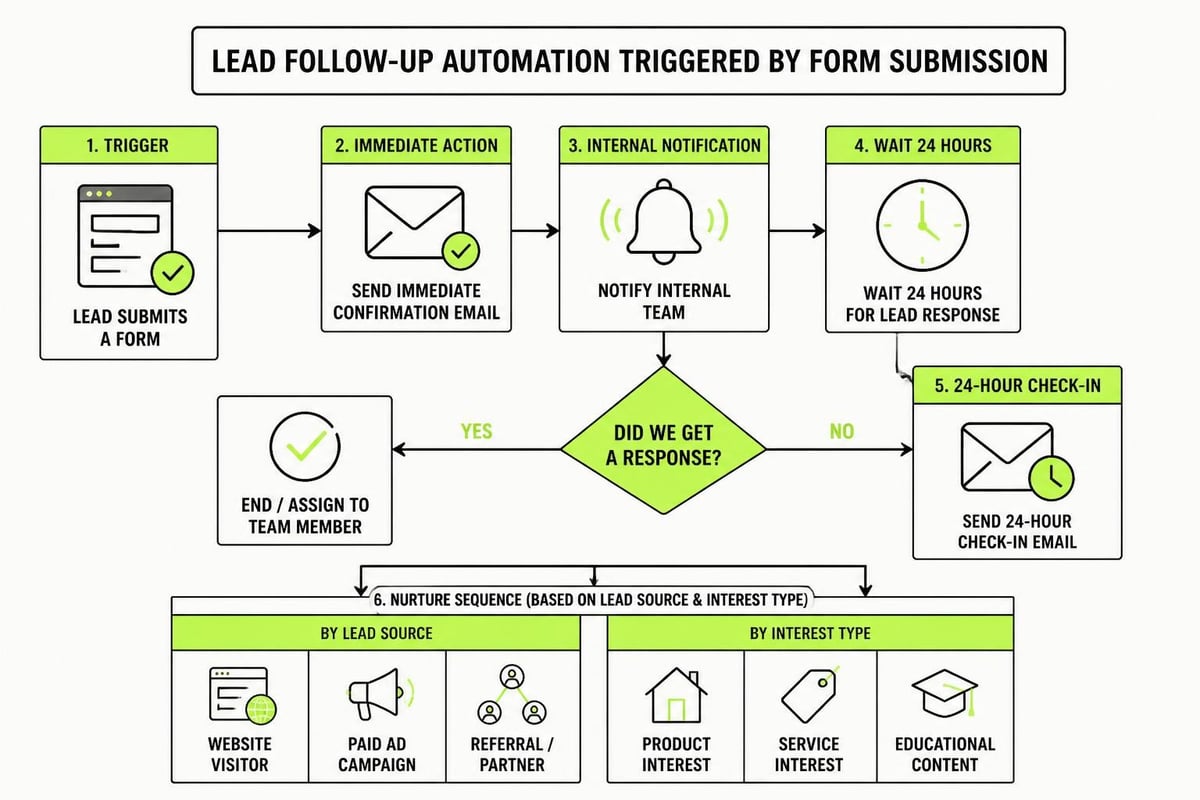
The moment someone becomes a lead is the moment your system should start working for you. Immediate confirmation emails build trust. They prove the form worked and set expectations for next steps. Instant notifications to your sales team or service delivery people mean someone can respond while the lead is still warm.
But automation doesn't mean impersonal. A well-designed lead capture system can trigger highly relevant follow-up based on what someone requested. Someone who downloads your pricing guide gets different emails than someone who asks for a custom quote. The system knows the difference because you've built that logic into your workflows.
Segment From the Start
Not all leads should enter the same nurture sequence. Someone from a paid ad campaign has different context than someone from a referral. A cold lead needs education. A warm referral needs a fast, personal response. Your lead capture systems should tag and route based on source, intent, and readiness.
This is where most businesses get lazy. They capture the lead but don't take the extra 30 seconds to add context. Where did this person come from? What offer did they respond to? What stage are they in? That information determines what happens next, but only if you capture it at the point of entry.
Protecting Leads After Capture
Getting the lead into your CRM is just the start. The real work is making sure nothing falls through the cracks. This means setting up task assignments, follow-up reminders, and pipeline stages that force accountability. If a lead sits in "new" for a week without movement, your system should flag it.
Many service businesses would benefit from a structured framework like the 7-Step Marketing Plan, which breaks down not just how to capture leads but how to move them through a predictable nurture process. The plan covers everything from defining your buyer persona to building CRM workflows that keep leads moving forward, creating a repeatable system instead of random acts of marketing.
Regular audits keep your lead capture systems healthy. Check for broken forms monthly. Review response times weekly. Look at conversion rates by source and identify where you're losing people. Small leaks compound fast when you're spending money on attention.
What to Measure
- Form conversion rate: Visitors to form submissions
- Source quality: Which channels produce leads that close
- Response time: How long until first contact after capture
- Lead-to-opportunity rate: How many captured leads become real prospects
- Drop-off points: Where in your forms or process people abandon
These metrics tell you if your system is working or just collecting digital clutter. A high form conversion rate with low lead quality means you're attracting the wrong people. A low response time with high drop-off later means your follow-up process needs work.
Advanced Lead Capture Tactics
Once the basics are solid, you can layer in more sophisticated approaches. Progressive profiling lets you gather information over time instead of all at once. Someone downloads three resources from you over two months? Your system can slowly build a complete profile without ever asking them to fill out a long form.
Hidden fields capture context automatically. You can track which page someone was on before filling out the form, what ad campaign they came from, or what content they've previously consumed. This information enriches your lead data without adding friction.
Real-time lead scoring helps prioritize follow-up. Someone who visits your pricing page three times and downloads a case study is hotter than someone who read one blog post. Your lead capture systems can assign scores based on behavior and surface the hottest leads to your team first.
| Tactic | Use Case | Complexity | Impact |
|---|---|---|---|
| Progressive profiling | Long sales cycles with multiple touchpoints | Medium | High quality data over time |
| Hidden form fields | Tracking campaign source and page context | Low | Better lead routing and reporting |
| Lead scoring | Prioritizing sales follow-up | High | Faster conversion of hot leads |
| Dynamic form content | Personalizing forms by traffic source | Medium | Higher conversion rates |
| Multi-step forms | High-value conversions requiring more info | Medium | Lower abandonment than long single forms |
Examples of effective lead capture strategies show how businesses in different industries adapt these tactics to their specific needs, from e-commerce to B2B services. The common thread is intentional design rather than default settings.
Choosing the Right Tools
Your lead capture systems need to integrate with your CRM. That's non-negotiable. If your forms feed into one place and your CRM lives in another, you'll spend hours every week manually transferring data. Tools like HubSpot, ActiveCampaign, or Pipedrive can handle both form building and lead management. For businesses that need more customization, Zapier or Make can connect best-of-breed tools together.
Live chat tools like Intercom or Drift can capture leads in real-time conversations and push them straight into your CRM with full conversation history. Email tracking tools show you when a lead opens your follow-up messages and which links they click. Call tracking platforms assign unique phone numbers to different marketing channels so you know which ads or pages drive phone leads.
The goal isn't to use every tool available. It's to pick the ones that cover your actual entry points and connect them to a central system where every lead is visible and actionable. Understanding lead capture basics helps you focus on what matters instead of getting distracted by features you'll never use.
Common Mistakes That Kill Conversions
Asking for too much information kills more conversions than anything else. You don't need someone's job title, company size, and budget to send them a free PDF. You need their email address. Save the qualifying questions for later in the conversation when trust is higher.
Not having a mobile-friendly form costs you half your potential leads. More than 60% of web traffic comes from mobile devices in 2026. If your form doesn't work smoothly on a phone, you're turning away the majority of your visitors.
Weak or generic offers don't motivate people to fill out forms. "Subscribe to our newsletter" isn't compelling. "Get the 5-step checklist we use to audit client websites" is specific and valuable. Your offer needs to be worth the friction of providing contact information.
Ignoring lead capture best practices like clear privacy policies, trust badges, and social proof leaves conversions on the table. People are cautious about sharing information. Your forms need to address that hesitation directly.
Integration With Your Broader Marketing Systems
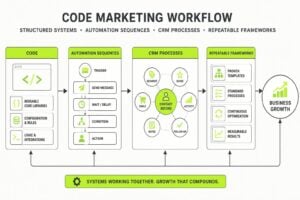
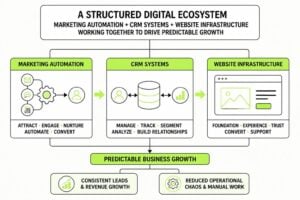
Lead capture doesn't exist in isolation. It's the bridge between your marketing and your sales process. Your digital marketing strategy drives traffic, your lead capture systems convert that traffic into contacts, and your CRM and nurture sequences turn contacts into customers. Break any link in that chain and the whole system fails.
This is why businesses that treat lead capture as a standalone tactic struggle. They run ads without optimized landing pages. They build beautiful websites without clear conversion paths. They capture leads but have no plan for what to do with them. The system only works when all the pieces connect.
Making Lead Capture Part of Your Business DNA
The best lead capture systems become invisible. Team members don't think about manually entering data because the system does it automatically. Leads don't wait in limbo because workflows trigger the next step immediately. Nothing gets lost because every entry point feeds the same central database.
Getting there requires upfront work. You need to map your current process, identify gaps, choose tools that integrate, build workflows that match your sales cycle, and train your team on how it all works. But once it's running, the system compounds. Every lead is captured. Every lead gets followed up. Every lead either converts or gets nurtured until they're ready.
That's the difference between hoping you don't lose leads and knowing you won't. It's the foundation of predictable marketing that scales without adding chaos.
Lead capture systems turn attention into opportunity, but only if they're built to protect every inquiry from the moment it arrives. Most service businesses lose leads not because their marketing fails, but because their systems do. If you're ready to stop losing opportunities and start building infrastructure that captures, protects, and converts leads consistently, MDO Digital can help you design the CRM and automation systems that turn chaos into predictable growth. We build marketing systems that work while you focus on delivering for clients.